Key Takeaways
- NitroPack provides website owners with a convenient solution to increase site speed through automated caching and code, image, and font optimization. This makes it particularly useful for WordPress users in the U.S.
- With NitroPack’s built-in CDN, your website will be able to deliver content and load swiftly for visitors anywhere in the country. This significantly reduces page load times, no matter where your audience is.
- Setup is easy. You really need to test and monitor your site once implemented to make sure all the features are playing nicely.
- Core web vitals and Google PageSpeed Insights score improvements can influence better Google rankings and a faster, more engaging user experience.
- Watch out for plugin conflicts and dynamic content issues. Evaluate NitroPack based on your own site requirements and budget.
- While NitroPack’s performance gains can justify the investment for high-traffic or e-commerce sites, smaller sites might want to consider more cost-effective options first.
NitroPack is a website speed optimization service designed to increase site load speeds and improve page speed scores, which is a big deal for SEO and time on-site.
Here’s why digital pros in the U.S. Love NitroPack: it provides instant wins in page load times and gets sites ranking higher.
In this review, see how NitroPack performs on actual sites, along with what sets it apart for SEO projects.
Core Functionality

NitroPack is a full-service optimization solution that combines caching, code optimizations, image compression, font optimizations, and CDN delivery, making it a preferred speed optimization tool for WordPress websites.
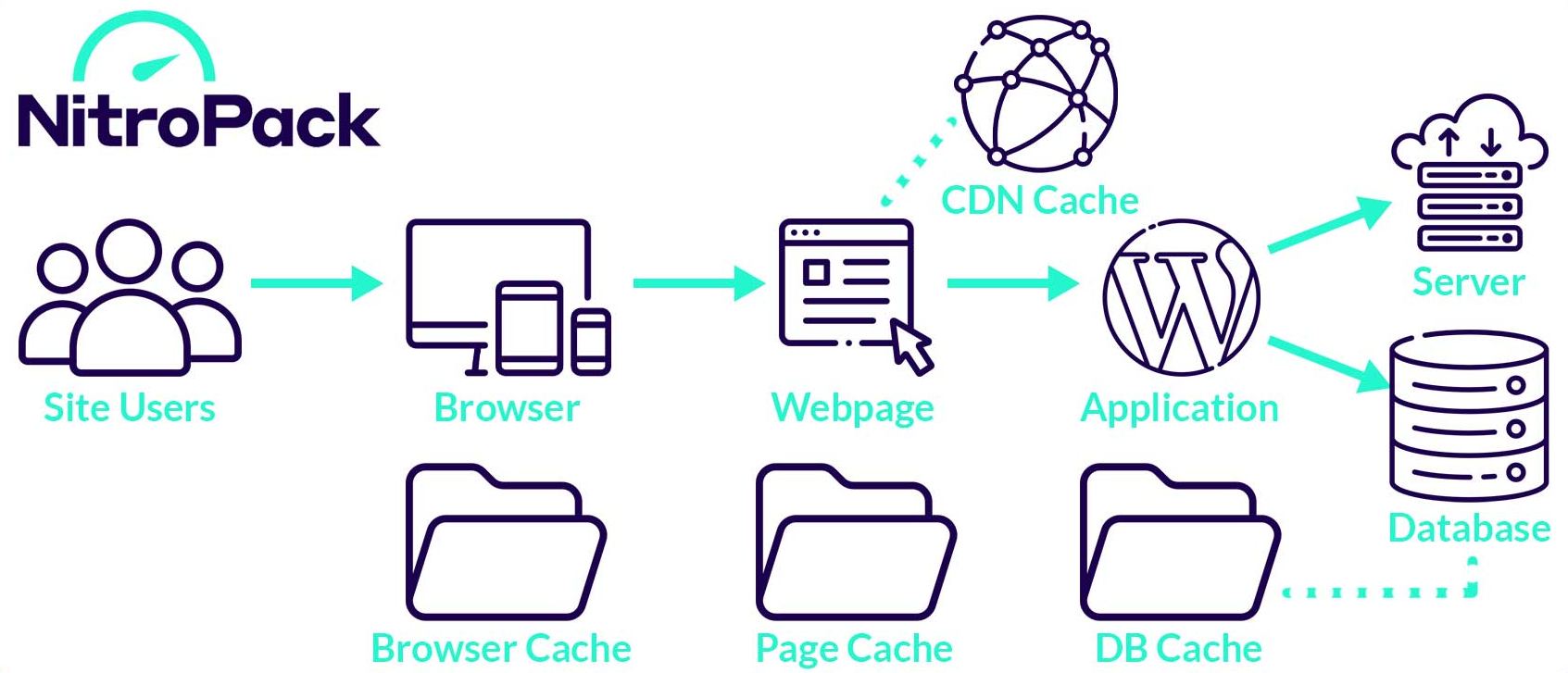
This tool automates the bulk of the hard work, allowing digital marketers and SEO professionals to focus on client growth rather than the technical configuration required for effective website optimization.
1. Caching
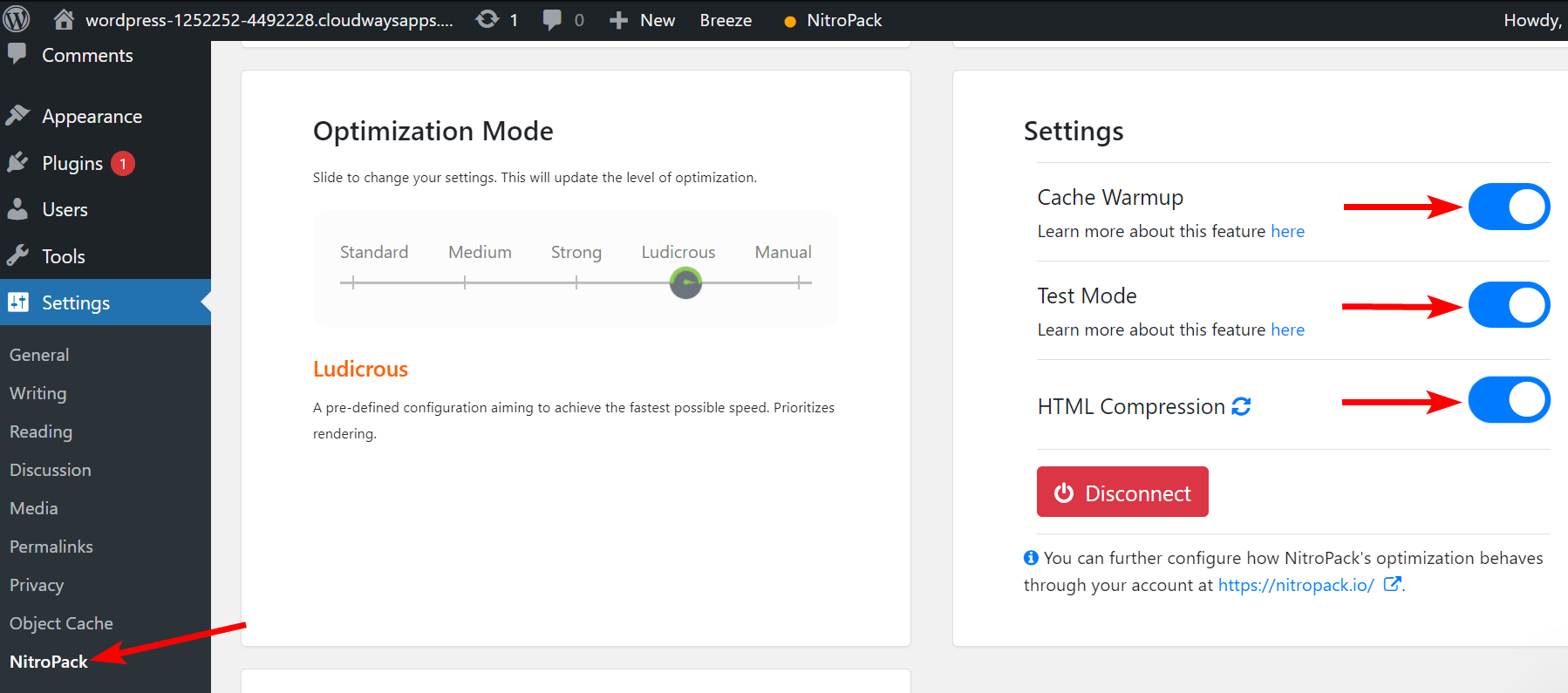
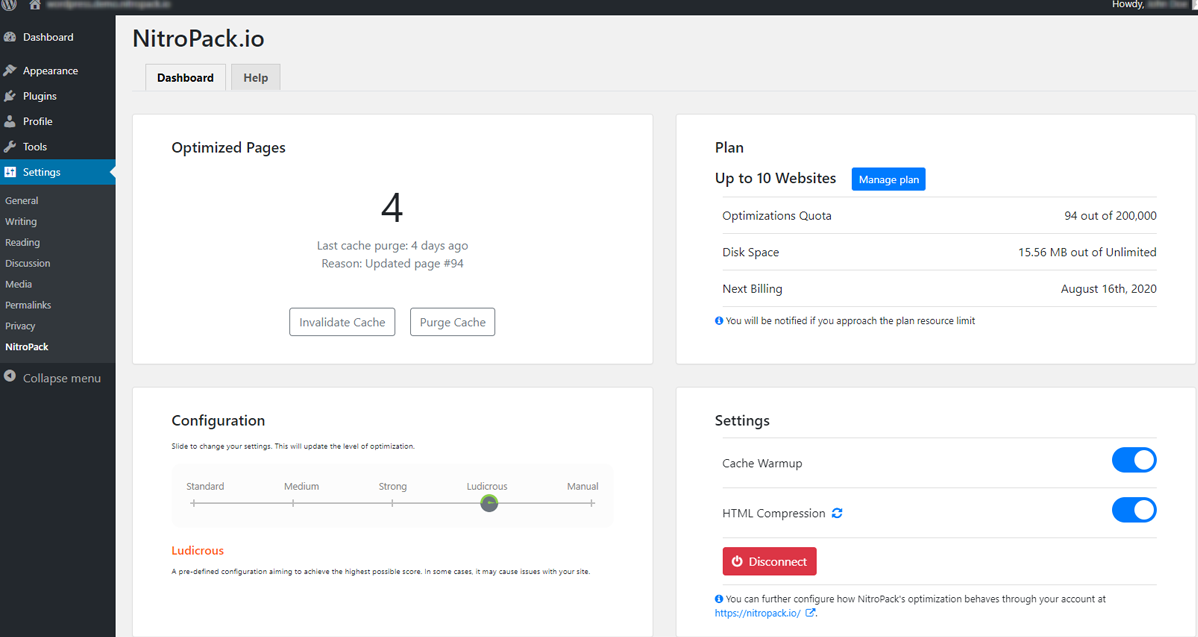
Caching is the foundation of NitroPack’s speed increase. The platform removes all the guesswork by processing millions of cache requests daily, so your server doesn’t break a sweat. It includes instant cache for fast content serving, along with a ‘Purge all cache’ button for manual resets.
You’ll get advanced cache warmup options that allow you to select from normal or sitemap-based options, useful for large sites with a lot going on. The dashboard displays cache information, allowing you to monitor what is being served and adjust settings in real-time.
2. Code Optimization
NitroPack dazzles in code optimization by minifying JavaScript and CSS, frequently resulting in a Google PageSpeed increase. Deferring scripts is simple, allowing you to choose which code loads first.
Critical CSS is impressive; it automatically generates what’s required for above-the-fold content and delivers it with the first bundle from the server. This can accelerate load times for users in locations such as Texas or New York. You don’t have to tinker with settings too much, but if you wish, the platform provides fine-tuned control.
3. Image Optimization
Image processing is huge for SEO and UX. NitroPack compresses images, converts images to formats such as WebP, and you can configure the quality. There’s even a compression preview, so you know what the visitor will see.
Lazy loading makes pages start faster, and you typically see results immediately in PageSpeed Insights. For agencies handling tons of sites, being able to deploy image tweaks without breaking a sweat is a time saver.
4. Font Rendering
Fonts, if not handled properly, can significantly slow down a site. NitroPack allows you to preload critical fonts, which brings text up on the screen sooner. Select the fonts you care about, reduce render-blocking, and test results instantly.
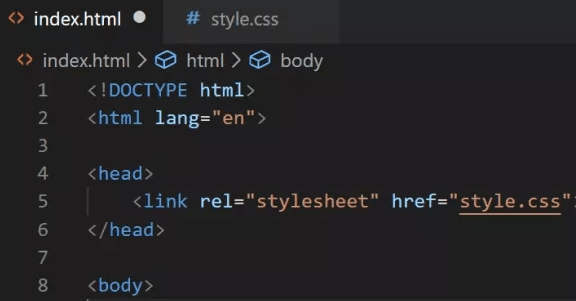
When font optimization is done well, users have clean pages without having to wait for text to pop in. These little gems can make a site feel a lot more polished.
5. CDN Delivery
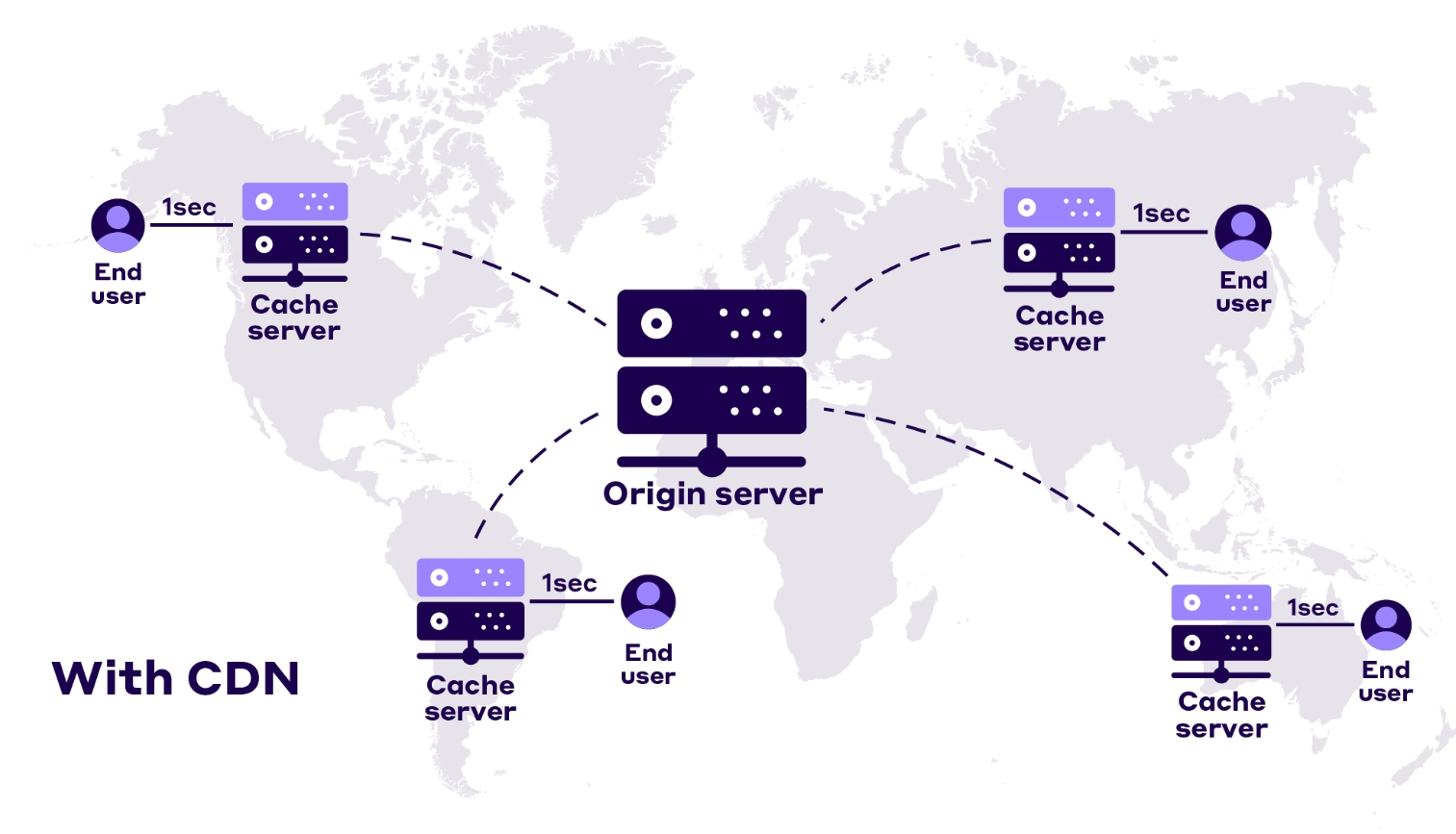 NitroPack has a built-in CDN, delivering your content from servers closer to your visitors, whether they’re in Austin or LA. The CDN reduces latency, accelerating load times for all users.
You can view delivery zones, performance numbers, and adjust settings from the dashboard. That translates into less downtime and fewer slow site complaints, which is particularly handy for agencies with clients across the nation.
Implementation Process
Getting NitroPack up and running generally begins with a plugin or software install, a process that can take under five minutes. For most SEO consultants and agencies, this quick setup translates to less downtime and quicker results. After installation, the next step is connecting the site to your NitroPack account by inputting a couple of important details—no advanced technical knowledge or additional software necessary. This performance optimization tool is designed to enhance your website performance efficiently.
After this, the NitroPack dashboard serves as your home for simple settings. Advanced tweaks reside in their own interface. This bi-level framework enables agencies to address both shallow and deep optimization without a lot of hoop jumping.
By using this optimization tool, users can streamline their website optimization processes effectively.
- Download and install the NitroPack plugin or software.
- Link the plugin to your site account with your API key.
- Access the dashboard for basic setup and quick configuration.
- Fine-tune advanced options in the separate NitroPack interface.
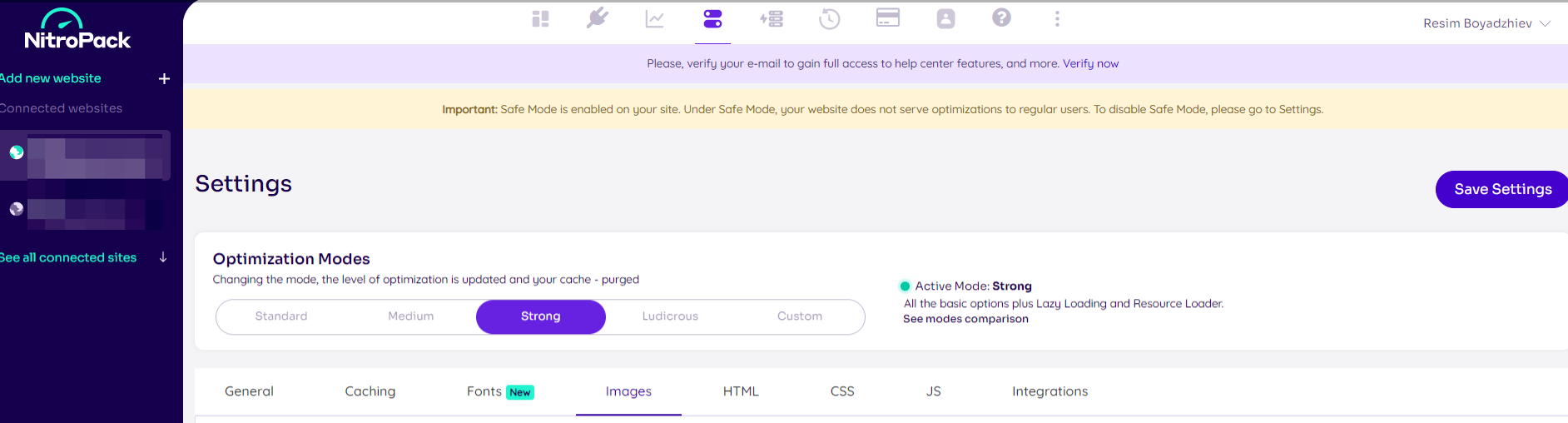
- Select an optimization mode, such as “Standard,” “Strong,” or a custom configuration.
- Manage cache and run purges directly from the dashboard.
- Test site speed and Core Web Vitals after setup.
Fine-tuning NitroPack is where you unlock its full potential. The dashboard offers easy toggles for lazy loading, image compression, and minification, while advanced settings let you control scripts or exclude pages from optimization. Agencies often tweak these for image-heavy sites to keep everything smooth. The pre-set modes—from “Standard” to “Strong”—are a solid start, but testing key pages and checking Core Web Vitals like Largest Contentful Paint is essential. If issues pop up, you can quickly roll back changes, and NitroPack’s support team is always available to help you keep your site fast and reliable.
Performance Impact
NitroPack’s entire ethos is speeding up your site and keeping it running smoothly. For web pros in the U.S., speed isn’t just nice; it’s the soul of a good online experience. Everyone wants to see their site load in 3 seconds or less, and NitroPack’s optimizations help 90.10% of pages reach that threshold.
Cutting the wait time means people stay, bounce rates fall, and search rankings rise. For agencies and consultants, these results matter because clients want evidence that their investment is yielding returns.
Core Web Vitals
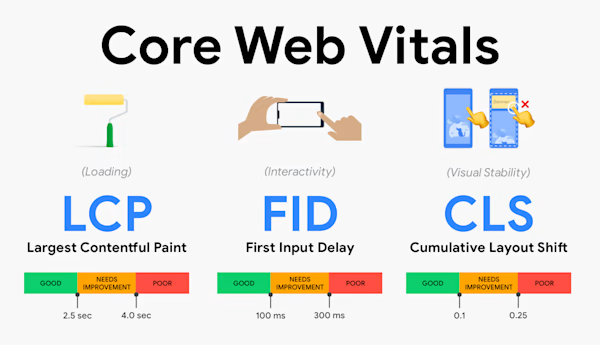
NitroPack is a game-changer for Core Web Vitals. Post-deployment, the majority of sites experience improved LCP and FID metrics. Big pictures and copy load faster, and people begin clicking and scrolling earlier.
One client saw his LCP fall from 2.8 to 1.3 seconds, deep inside Google’s green zone. NitroPack maintains these scores, regardless of whether someone is landing from a phone or laptop. It achieves this through intelligent caching.
Browser, cookie, device, and session caching all combine to ensure critical content reaches the user quickly. Core Web Vitals enhancements imply that your site has a greater likelihood of ranking higher in searches, and Google’s algorithm favors pages that load in less than 3 seconds.
If you add Critical CSS right off the bat, you shave even more time, making a huge difference for users and search engines alike.
User Experience
- Users say pages load much faster after NitroPack.
- Navigation feels smoother; menus and buttons respond right away.
- Bounce rates drop, and people spend more time browsing.
- Sites feel lighter, especially on mobile.
- VisionImpactOnline.com Images load crisp and quick due to 25 to 35 percent smaller file sizes.
Clients frequently comment on how much simpler it is for visitors to locate what they’re seeking. Agencies notice more consistent attention spans and time-to-session increases.
If you see people still bouncing too quickly, you can adjust NitroPack settings, such as increasing image compression or caching, to suit user response and maintain strong performance.
Load Times

| Metric | Before NitroPack | After NitroPack |
|---|---|---|
| Avg. Load Time (s) | 4.6 | 2.0 |
NitroPack’s image compression, script minification, and advanced caching cut average load times by 57%. Speed tests demonstrate gains maintained in real time, not just in lab results.
Routine reporting allows you to share these victories with clients and stakeholders. These speedier load times even assist the planet. In one instance, a 75.5% reduction in greenhouse gas emissions was recorded, simply from operating a leaner, quicker site.
Pricing Tiers
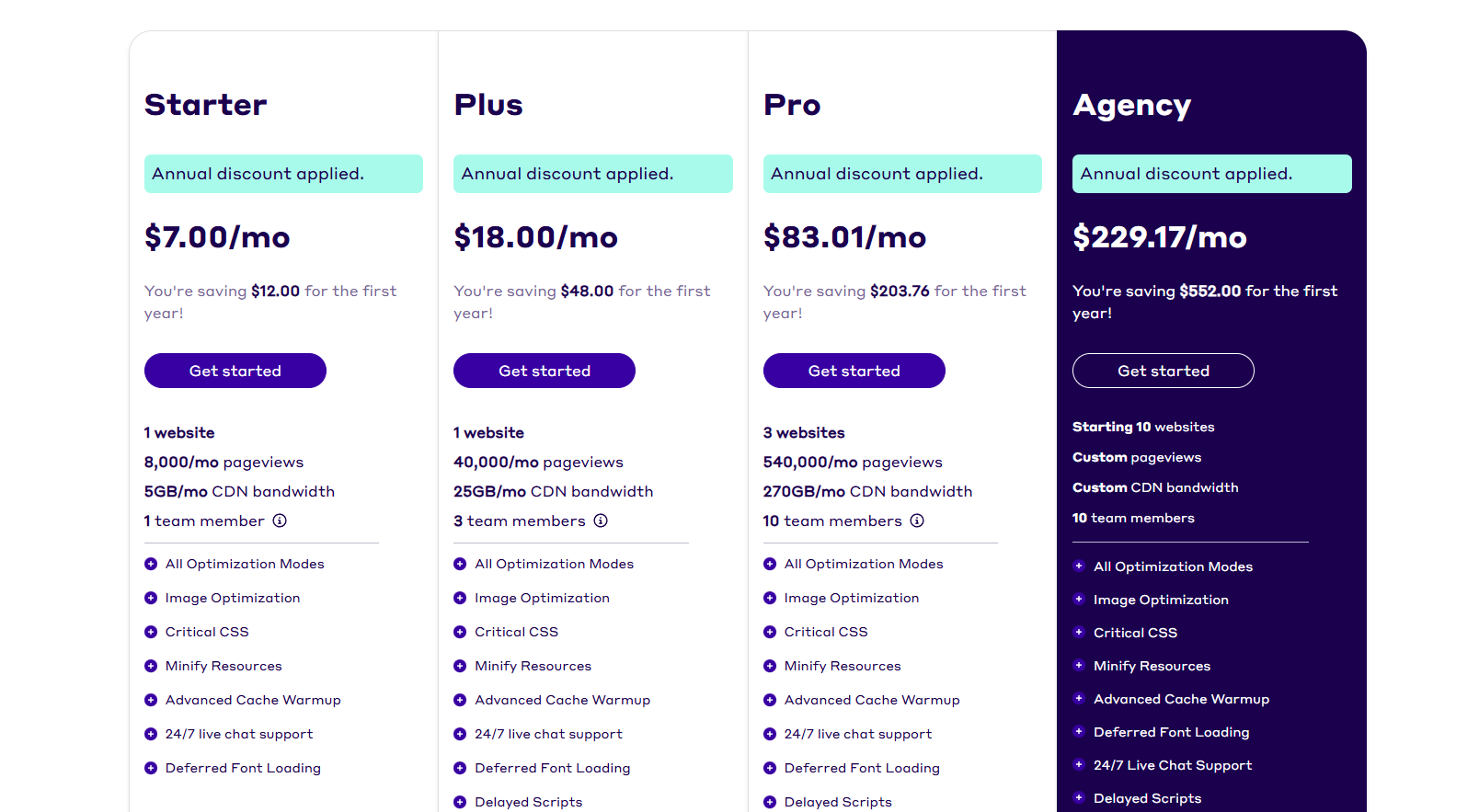
NitroPack keeps its pricing simple, with plans designed for different website sizes and traffic levels. The tiers range from the affordable Starter plan at around $8/month (or about $7/month if billed annually) to the powerful Agency plan at roughly $275/month for high-traffic and multi-site setups. Each plan comes with specific limits for monthly pageviews and CDN bandwidth, helping you scale as your site grows.
Starter Plan
Perfect for small websites or personal blogs, this plan supports around 8,000 monthly pageviews and 5 GB of CDN bandwidth. You get access to all core NitroPack features—like caching, image optimization, and the “Ludicrous” speed mode—without the NitroPack badge. It’s a great entry point for anyone who wants faster load times without needing technical expertise.
Plus Plan
At around $22/month (or $18/month annually), this plan boosts your limits to 40,000 pageviews and 25 GB of CDN bandwidth. It adds features like adaptive image sizing and allows up to three team members. This tier suits growing blogs or small e-commerce stores that need a bit more power and flexibility.
Pro Plan
Designed for heavier traffic, this plan costs around $100/month (or $83/month if billed yearly) and supports up to 540,000 pageviews and 270 GB of CDN bandwidth for three websites. You get every NitroPack feature—advanced caching, critical CSS generation, and 24/7 live chat support—making it ideal for agencies or large sites that prioritize speed and stability.
Agency Plan
The top-tier plan starts at about $275/month (or $229/month annually) and supports 10 websites with customizable pageview and CDN limits. It’s best suited for large businesses, high-volume e-commerce stores, or agencies managing multiple client sites. Enterprise-level users can also request tailored plans with higher capacity and dedicated support.
Overall, NitroPack’s pricing matches its performance. The Starter plan gives smaller sites a strong performance boost at a low cost, while the higher tiers deliver the scalability and support needed for serious web operations.
Since NitroPack combines caching, image optimization, CDN, and more into a single tool, it can save both time and money compared to juggling multiple plugins. And with annual billing discounts available, it’s a cost-effective way to keep your site consistently fast and SEO-friendly.
Is It Overkill?
NitroPack comes loaded with optimization tools, but not every site needs all that power. It’s like buying a race car just to drive to the corner store.
Here’s a quick breakdown:
- For smaller sites: If you’re running a local business site or a small blog, your pages probably load fast enough already. If your site loads in under two seconds and your visitors are mostly local, NitroPack might be more than you need.
- For bigger sites: E-commerce stores, media sites, and agencies handling lots of traffic will see real benefits. When thousands of users visit daily, shaving even a second off load time can mean better conversions, happier visitors, and higher rankings.
- Ease of use: While NitroPack is mostly plug-and-play, the dashboard can feel overwhelming at first. Fine-tuning settings takes a bit of learning—or help from someone tech-savvy.
- Cost considerations: Plans start around $20/month, which can add up for smaller sites. Free tools like WP Rocket or manual tweaks might get you decent results without the extra cost. But NitroPack includes extras like CDN, lazy loading, and image compression that save time and hassle.
- Real-world results: Some users say NitroPack boosts PageSpeed scores more than it improves real user experience. If your site already meets Core Web Vitals and loads smoothly, you may not notice much difference.
At the end of the day, NitroPack shines when speed truly matters—like for high-traffic or revenue-driven sites. But if you’re running something simple and lightweight, you might not need the full toolbox. Sometimes, less really is more.
Conclusion
NitroPack truly delivers when it comes to boosting site speed and improving overall performance. Digital marketers and SEO professionals will notice the jump in site scores, reduced bounce rates, and smoother user experiences. It’s easy to set up, saves time on technical tweaks, and brings clear results—especially for busy sites and agencies. While it may feel like a splurge for smaller blogs, the value becomes obvious once you see the difference in speed and conversions.
If you’re serious about SEO and want expert guidance on getting the most out of tools like NitroPack, check out SirLinksalot. They specialize in helping sites rank higher and perform better—because faster sites deserve stronger visibility.
Frequently Asked Questions
What does NitroPack do for websites?
NitroPack is a performance optimization tool that accelerates websites by optimizing images, caching, and minifying code, enhancing overall performance and load speed.
Is NitroPack easy to set up for beginners?
Sure, NitroPack is easy to use as a performance optimization tool. Even better, most NitroPack users can install and configure it without a technical hand, making it ideal for WordPress optimization.
How much does NitroPack cost?
NitroPack offers multiple price levels, including a free NitroPack account for starters. The paid plans start at approximately $21 per month, catering to larger eCommerce stores or more intricate sites.
Will NitroPack help my website rank higher on Google?
A faster site enhances user experience and can improve your Google rankings. NitroPack’s primary focus is on website optimization to boost loading speed, a crucial factor for Google rankings.
Are there any hidden fees or complex configurations?
No hidden fees exist, although some advanced features may necessitate manual tweaking. The default settings of this performance optimization tool work great out of the box for most nitropack users, but they can become complex for custom setups.
Does NitroPack work with all web hosting providers in the US?
NitroPack works with the majority of US hosters, making it a preferred speed optimization tool; verify with your host or NitroPack’s docs for seamless integration.
Is NitroPack overkill for small businesses or personal sites?
On very small sites, NitroPack’s advanced features may be overkill, yet its website optimization tools can deliver impressive speed gains with minimal work.