Key Takeaways
- SSL is your first line of defense for keeping personal and financial information safe when you’re surfing or shopping online.
- Secured connections, supported by SSL certificates, establish trust with your visitors and provide your site with the crucial padlock icon, indicating that you are committed to security.
- Having the correct SSL certificate and a trusted Certificate Authority ensures that your site is secure and that both your users and search engines recognize this.
- Forgetting to update SSL settings and certificates is a common mistake that can quickly turn into a disaster, as expired certificates erode user confidence and weaken security.
- By embracing the latest TLS standards and remaining aware of emerging threats, such as quantum computing, you can maintain your website just ahead of the criminals.
- With SSL, you can give your site a leg-up in Google search rankings, bringing more traffic and helping your business shine through the noise.
When you see a little padlock in your browser’s address bar, that’s Secure Socket Layer (SSL) at work. SSL is the standard security protocol that encrypts data as it travels between a website and a user’s device—keeping private details like passwords, credit card numbers, and personal information safe from prying eyes.
In today’s digital world, SSL isn’t optional. From online retailers and financial institutions to everyday business sites, SSL has become a must-have for protecting users and building trust. In this article, we’ll break down exactly what SSL is, why it matters, and the key advantages it brings to websites and their users.
SSL Explained
SSL, or Secure Sockets Layer, is a protocol that preserves web communication privacy by encrypting data between a website and a browser. When you notice a padlock or “https” in your browser’s address bar, that’s SSL doing its thing. SSL certificates, provided by CAs, verify a web address’s authenticity and encrypt data so that only the intended recipients can access it.
For SEO consultants, digital marketers, and agencies, SSL isn’t only about data safety — it’s a sign that informs websites’ rankings and retains users’ trust while they’re transacting.
1. The Handshake
The SSL handshake initiates each secure session online. A browser contacts a website’s server and requests to connect. The server responds with its SSL certificate, which the browser verifies against a list of trusted CAs.
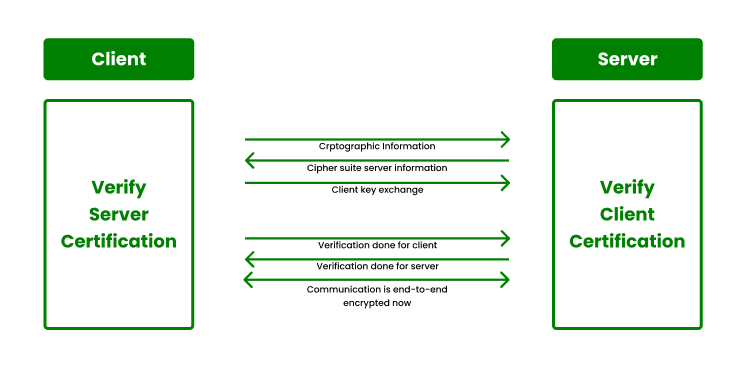
If it corresponds, the browser and server negotiate how to encode the information, selecting compatible protocols. They generate and exchange session keys—ephemeral keys which encrypt and decrypt information for the duration of the session.
This handshake all goes down behind the scenes in a few seconds, but it’s what lets you shop, sign in, and send forms without concern.
2. Encryption Keys
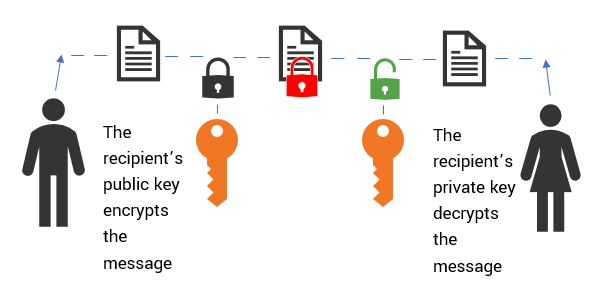
SSL employs two types of keys. Public keys are distributed to all who wish them; private keys remain confidential on the server. As you connect, data is locked with the public key; only the private key can unlock it.
After the handshake, both sides use a symmetric key, which is faster since it’s the same key for both. Key size counts–a 256-bit key is standard and hard to break. Secure key storage is essential — if a private key leaks, the entire infrastructure can come crashing down quickly.
Encryption is like a lockbox. If you don’t secure the keys, anyone can enter.
3. The TLS Shift
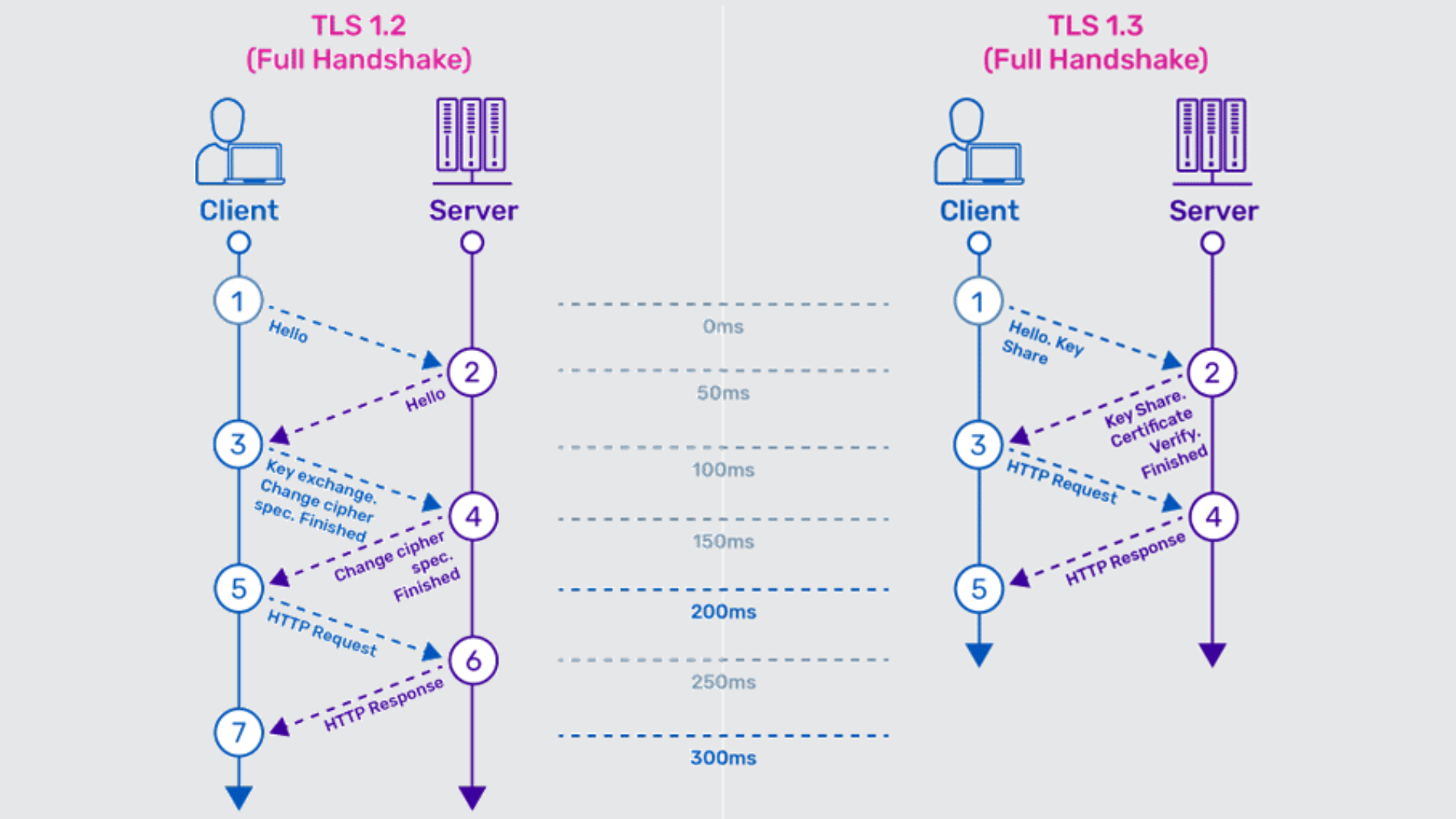
SSL’s tale didn’t conclude with its final edition. In 1999, the protocol got major upgrades and a new name: TLS, or Transport Layer Security. Every iteration since — such as TLS 1.2 and 1.3 — delivers stronger security, increased performance, and improved privacy.
Utilizing the most up-to-date TLS keeps sites safer from hacks. Still, most people say “SSL” by rote, even though current sites operate on TLS.
4. Certificate Types
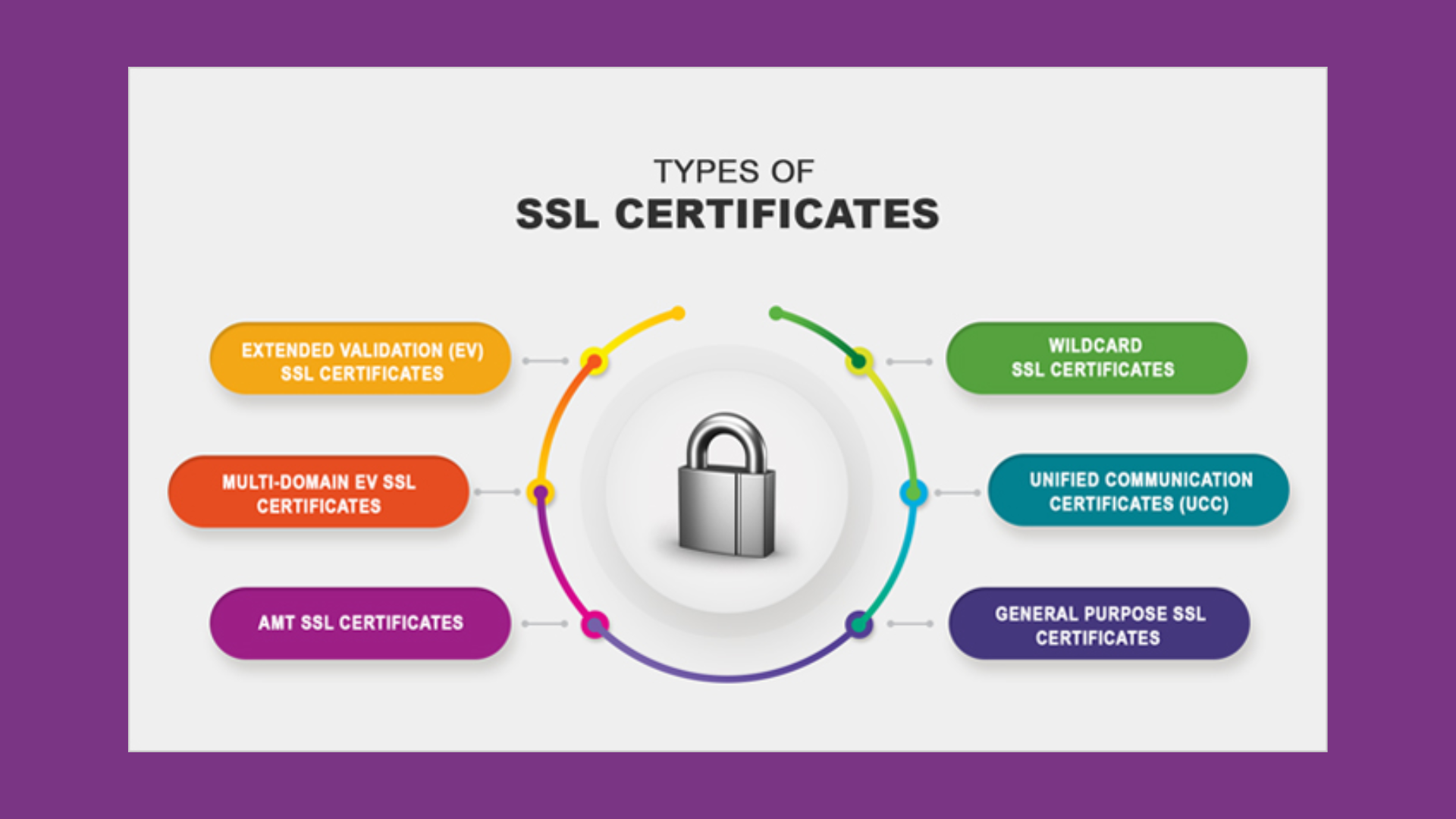
Not all SSL certificates are created equally. DV certs are easy to obtain and suit minor sites. EV certs display additional identity information, useful for banks or retailers.
Selecting the appropriate type is based on your users’ requirements. Wildcard certificates allow you to protect multiple subdomains—great for businesses with a bunch of site areas.
5. Authority Role
Certificate Authorities are the SSL trust backbone. They verify a site’s owner and grant certificates after review. A reputable CA is important because if a questionable CA gets compromised, hackers can impersonate secure sites.
That’s why its validation steps are stringent, including legal and business checks. All of the web depends on these watchdogs to maintain trust.
Why It Matters
SSL, or Secure Socket Layer, protects online transactions. It protects user data on the fly, preventing snoops and hackers. Whenever cash, medical records, or sensitive data transits a page, SSL armor that info. Here in the US, where we shop and bank online every day, SSL is a big factor in maintaining user confidence.
Non-SSL sites risk more than stolen data—they risk having their reputation compromised and losing their ranking in search results.
Data Integrity
SSL does more than mask data. It preserves it in one piece. With SSL, information exchanged between browsers and servers cannot be altered without it being detected. It does so by hashing—math that examines, bit by bit, if anything’s changed in transit.
If it doesn’t line up, the link gets cut. When sites jump SSL, bad guys can fiddle with data before it arrives on the other end. This can be switched bank information, fraudulent bills or worse.
When user information gets hacked or stolen, trust evaporates quickly. Security isn’t only about privacy — it’s about ensuring that every message, form, or payment remains exactly as the sender intended. In the end, SSL supports the basic promise every website makes: that what you send is what arrives.
SEO Boost
Google spelled it out — SSL (HTTPS) sites search better. This isn’t purely hypothetical. Sites that moved from HTTP to HTTPS experienced higher rankings and increased click-through rates. For marketers online, that’s an easy way to outsmart the competition.
With more consumers looking for services online, SSL is now mandatory for discoverability. Not having it translates into falling behind in rankings, missing traffic, and foregoing leads. SSL results in less browser warnings, so people don’t bounce before they even see your site.
Getting Started
Configuring Secure Socket Layer (SSL) is a smart play for any site that deals with user data or sensitive information. SSL assists in keeping information secure as it travels between a browser and your server through encryption. For SEO agencies, consultants, or anyone with U.S.-based sites, getting SSL right masks the brand and visitors.
So here’s your process/decision breakdown of what really counts.
Step-by-Step: Acquiring an SSL Certificate
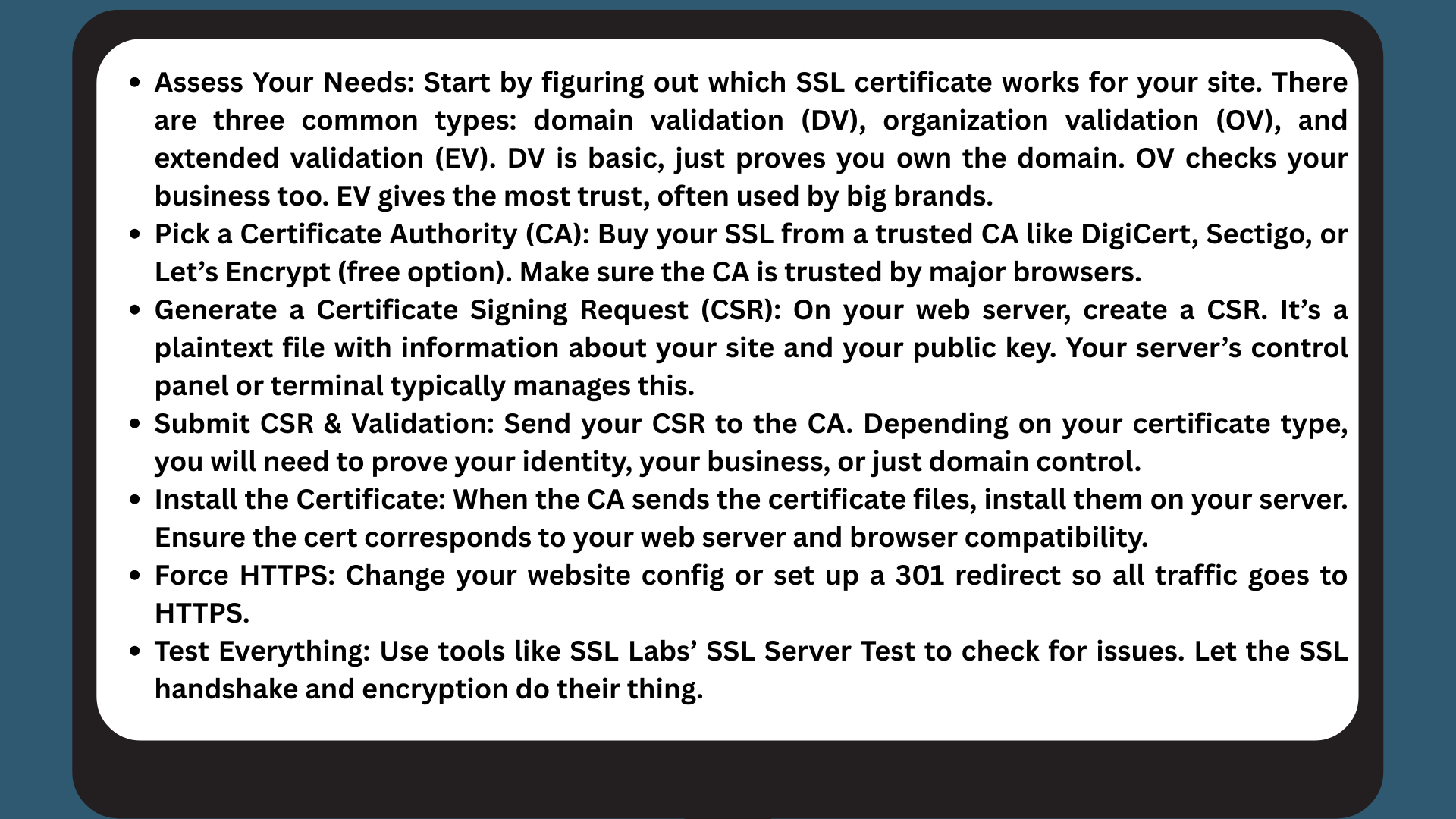
Server Setup
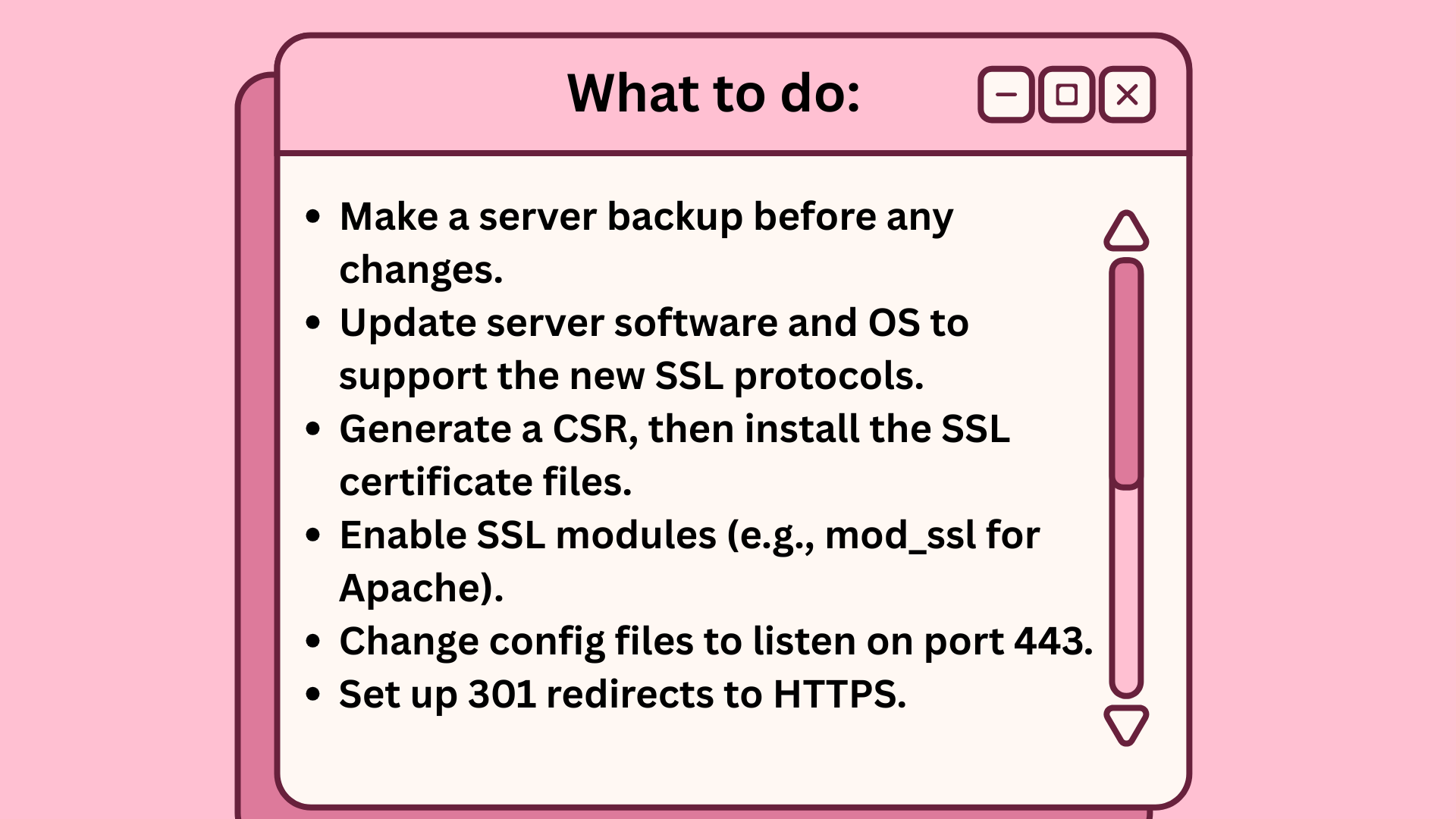
Keep your server software current. New releases patch bugs and add support for strong encryption. For Apache, turn on mod_ssl. For Nginx, modify the server block for HTTPS. IIS uses the certificate wizard. Firewalls have to permit port 443 for SSL or users won’t access.
WordPress Guide
Installing SSL on WordPress starts with the same steps: buy a cert, generate a CSR, and install it through your web host or server. A lot of hosts provide one-click SSL, but some require manual labor.
Plugins such as Really Simple SSL make the switch to HTTPS simple by auto-updating your URLs and fixing mixed content. After installing SSL, go to Settings > General and update both the WordPress Address and Site Address to use https://.
Verify mixed content warnings, such as images or scripts still using HTTP. Use browser tools or plugins to catch these quickly.
Common Pitfalls
SSL protects sites, but even minor miscues can confuse those who deal with it daily. In Austin, and across the U.S., digital marketers and SEO pros handle SSL headaches all the time. Keeping on top of these problems reduces lost traffic and keeps brands out of hot water.
Misconfigurations
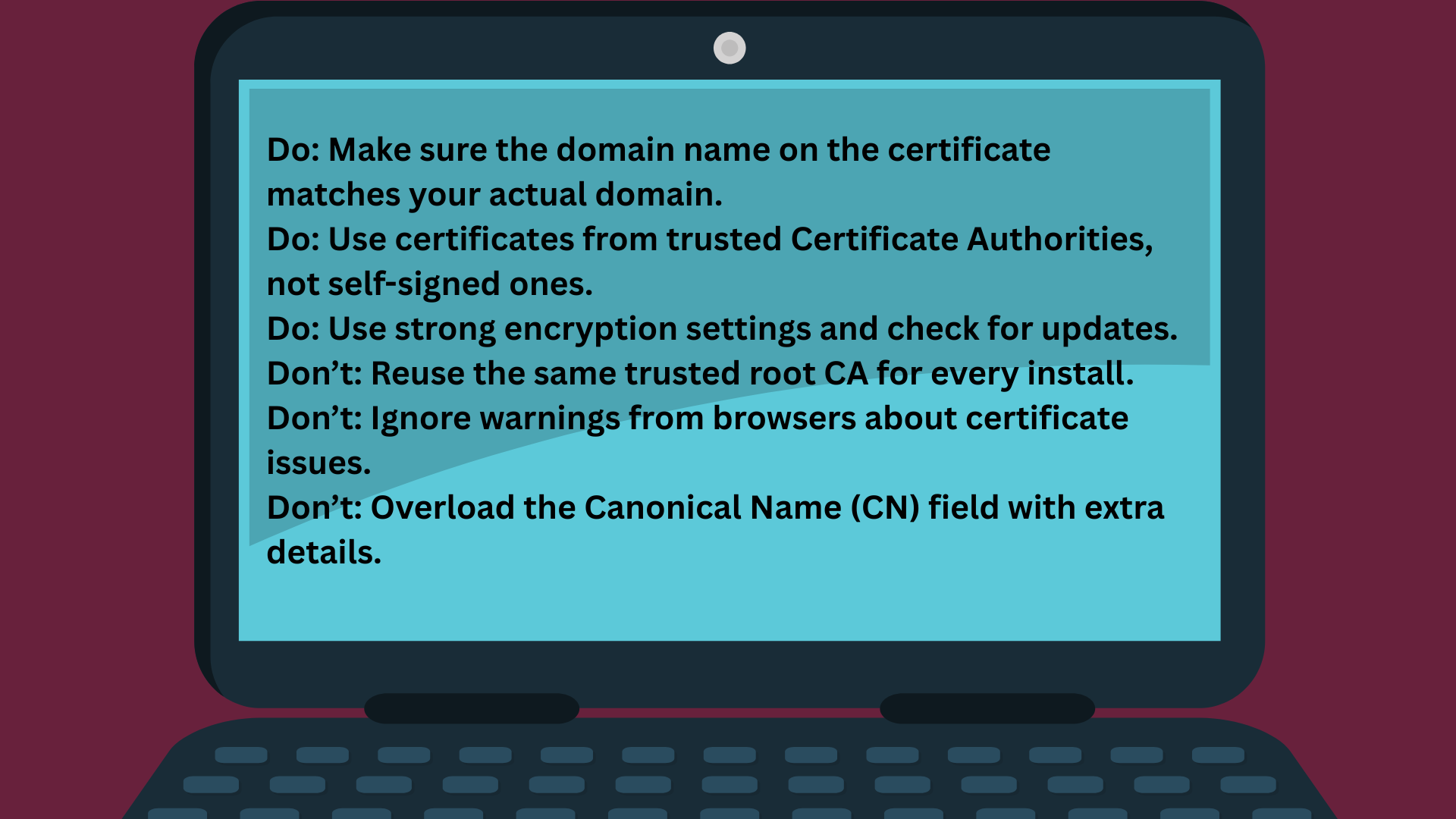
Mix-ups happen fast—like using a certificate for mysite.com on www.mysite.com. That mismatch sets off browser warnings, terrifies visitors and damages trust. A few tools allow you to verify this. Sites like SSL Labs or DigiCert’s checker tell you if your setup is strong. They can identify expired certs, weak ciphers or incorrect chain order.
With SSL settings off, browsers can hide the actual cause of failure. Even worse, a few SSL inspectors only warn after forwarding your request to the server, leaving you exposed to attack. Worse, if you use free certificates, their short lifespan means even a minor renewal delay causes downtime and lost rankings. Never trust one root CA for all installs—if someone grabs the private key, they could spoof any site.
Renewal Lapses
- Set calendar reminders for each SSL certificate.
- Use email notifications from your certificate authority.
- Consider automated renewal tools or scripts.
- Maintain a renewal log for quick reference.
Missing to renew SSL certificates can down your site and break trust. Expired certificates don’t just display alarming browser warnings—they can allow attackers to intrude, particularly if self-signed or weak certificates are involved. Tools such as Certbot or baked-in hosting platform features assist with tracking. They eliminate the possibility of a human error, which occurs more frequently than you’d expect.
Free SSLs, like Let’s Encrypt, are convenient, but their 90-day window forces tight scheduling or automation.
Future Threats
SSL has done a lot to protect online data, but the threats keep evolving. Attackers get more imaginative each year and the risk for digital marketers and SEO firms just increases. Hackers now use SSL stripping attacks—such as ARP spoofing, DNS cache poisoning, and proxy servers—to intercept and modify data between users and websites, and often they do so undetected.
Even reputable malware protection tools can use SSL hijacking to inspect traffic, so simply installing software isn’t necessarily secure. Public wi-fi and other unprotected networks open the door further, making VPNs and safe networks a necessity for any day-to-day work. With these threats, staying current on data protection isn’t only wise—it’s the sole means of getting out in front.
Quantum Computing
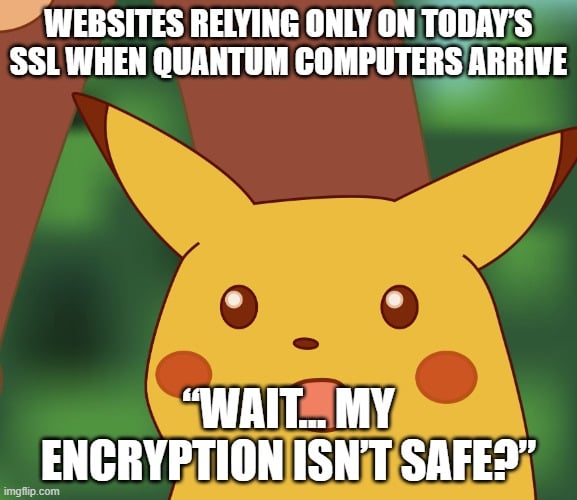
Quantum Computing Will Disrupt the Encryption World. Currently, SSL relies on mathematical problems that are computationally intensive for today’s computers to solve, such as factoring large numbers. Quantum computers could solve these problems much faster, and that includes breaking most SSL encryption.
The concept of quantum-proof encryption isn’t a buzzword — it’s a necessity. Scientists are hard at work developing new algorithms that are resilient to quantum attacks, but they’re not yet ready for practical use. NIST is at the forefront, though it’s a gradual, ongoing trial.
Getting ready for the post-quantum world entails beginning to get acquainted with these new tools, so you’re not left behind when change arrives.
Protocol Evolution
SSL is a different animal than when it first arrived. The transition from SSL to TLS is only the beginning. Every year, new vulnerabilities surface and security advisories quickly ensue. If you continue running outdated versions, such as TLS 1.0 or 1.1, your data is vulnerable, period.
Upgrading to the most recent versions of such protocols—like TLS 1.3—shouldn’t be a low priority, either. Industry groups like the IETF determine the standards, and they adapt as soon as new threats are identified. Routine updates and patching aren’t geek work, they’re your shield.
When you skip updates or cling to old ways, that can mean falling behind and putting your clients in jeopardy.
Compliance Impact
SSL isn’t just a tech upgrade—it’s a must for people with online stores, agencies, or any organization processing sensitive information in the US. These certificates operate quietly in the background to secure data, assisting in compliance with a broad array of regulations. That’s more than just good practice — it’s a necessity for anyone who wants to remain in business and out of court.
|
Standard |
Requirement |
SSL’s Role |
|---|---|---|
|
PCI DSS |
Secure payment card data |
Encrypts card details in transit |
|
HIPAA |
Protect health info |
Secures patient data sent online |
|
GDPR |
Safeguard personal data |
Encrypts personal info from U.S. users |
|
SOX |
Secure financial reporting |
Secures data transfers and login sessions |
SSL isn’t just about security — it’s required for compliance.
- PCI DSS: Any business processing payments must transmit cardholder data securely. SSL handles that with strong encryption.
- Healthcare (HIPAA): Clinics and health apps need SSL to protect sensitive patient data like names, test results, and insurance details.
- GDPR & International Users: U.S. sites with global visitors must comply with privacy laws. SSL ensures personal data is encrypted from the browser onward.
Beyond avoiding audits, fines, or lawsuits, SSL builds trust. Customers want proof that their information is safe, and without it, both regulators and users may walk away.
Conclusion
SSL isn’t just a padlock in the browser bar—it’s the backbone of trust online. In Austin and beyond, people don’t think of it as tech jargon; they see it as real protection for their data. Whether it’s shopping, signing up, or running your own business, SSL keeps information secure and reputations intact.
Skip it, and you risk more than hacks—you risk plummeting rankings and lost credibility (we’ve seen it happen). With security threats rising, rolling the dice isn’t an option. SSL builds user confidence, keeps Google happy, and proves your brand takes trust seriously.
Want to stay ahead of the curve? The team at SirLinksalot knows the moves that keep your site secure, strong, and visible—Texas style.
Frequently Asked Questions
What is Secure Socket Layer (SSL)?
SSL is a technology that encrypts data between your browser and the website. It helps safeguard confidential data, such as credit card numbers, from hackers.
Why do websites in the U.S. need SSL?
SSL creates customer confidence, safeguards sensitive information, and complies with industry-specific standards for e-commerce. It’s an absolute necessity for any American web site with personal information.
How can I tell if a website uses SSL?
Look for “https://” at the start of the web address and a padlock icon in your browser. Both show that SSL is enabled.
Is SSL required for compliance in the U.S.?
Yes. Several US laws, such as HIPAA and PCI DSS, require SSL for specific sites, such as those managing healthcare or payment information.
What are common mistakes when setting up SSL?
Typical errors are to deploy outdated certificates, not to redirect to HTTPS, and not to update all website links. These can undermine security.
Can SSL prevent all cyber threats?
No, SSL just encrypts data in transit. It can’t stop malware, phishing, or other cyber attacks by itself.
How often should SSL certificates be renewed?
The majority of SSL certificates are valid for 1-2 years. Remind me to renew before they expire so as not to have security warnings for your visitors.