Key Takeaways
- Well-implemented pagination SEO means search engines can easily navigate and index your valuable content, allowing your site to reach more people around the globe.
- Solving crawl budget, duplicate content, and link equity with intelligent pagination enshrines your site’s authority and search presence.
- User experience — When SEO-friendly pagination helps your users, your content is more digestible for all.
- Auditing your pagination on a regular basis will help you catch common errors, like incorrect canonicals or blocked pages, and ensure your SEO is on point.
- Staying current with pagination best practices, including leaving behind outdated techniques like
rel=prev/next, ensures your site remains in step with changing search engine algorithms. - By testing alternatives such as infinite scroll, load more buttons, and view all pages, you discover the most user-friendly solution without compromising SEO.
Pagination SEO is about taking intelligent measures to aid search engines in discovering and parsing content spread on multiple pages. This simplifies sites with large numbers of products, posts, or listings for humans and bots to navigate.
Well-planned pagination can get pages to rank better in search and prevent issues such as duplicate content. For SEO agencies and consultants, knowing how to set up pagination right is key to keeping big sites strong in search.
Why Pagination SEO Matters
Pagination SEO is not just a technical repair. It’s a design decision about how users and search engines navigate your site. When configured properly, pagination keeps navigation fluid, aligns with SEO objectives, and assists visitors in locating their desired content in fewer clicks.
Mishandle it and you risk thin content, lost authority, and wasted crawling resources.
|
Impact Area |
Crawl Budget |
Link Equity |
User Experience |
|---|---|---|---|
|
Positive Effect |
Efficient indexing of key pages |
Authority focused on main URLs |
Easier navigation, less overwhelm |
|
Negative Effect |
Wasted crawl on low-value pages |
Equity diluted across many URLs |
Confusion, harder to find info |
1. Crawl Budget
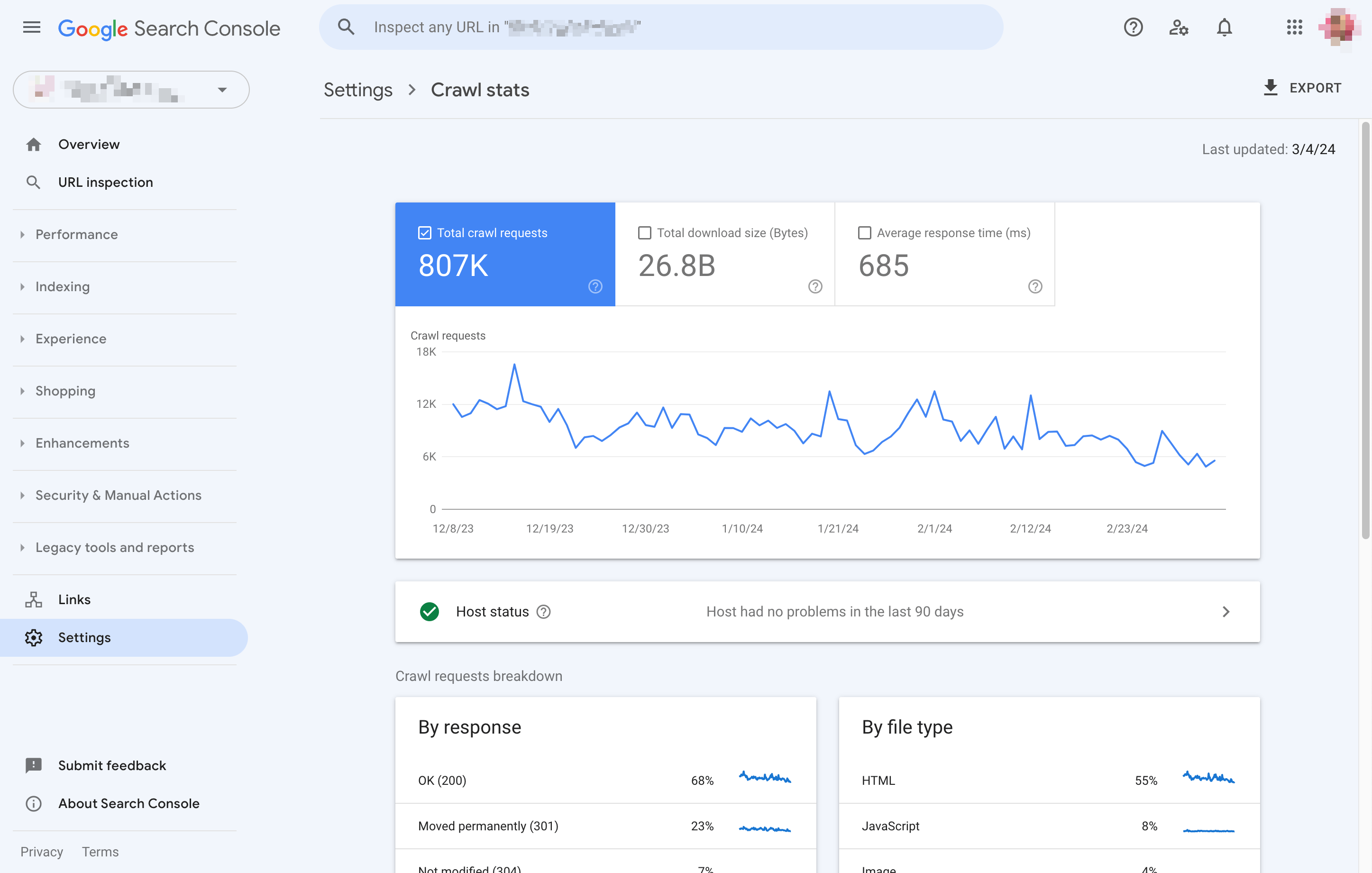
Crawl budget is essentially a search engine’s time limit on your site. Every site has a limited number of pages bots will crawl in a visit. If bots waste time on infinite paginated URLs like /page/3, /page/4, and so on, your MUST pages won’t get seen or indexed.
Tools such as Google Search Console provide insight into the pages that are crawled, allowing you to identify waste and make adjustments. If you catch bots crawling tons of crummy paginated URLs, it’s time to adjust your pagination config and internal links so your really important stuff gets the focus it deserves.
2. Duplicate Content
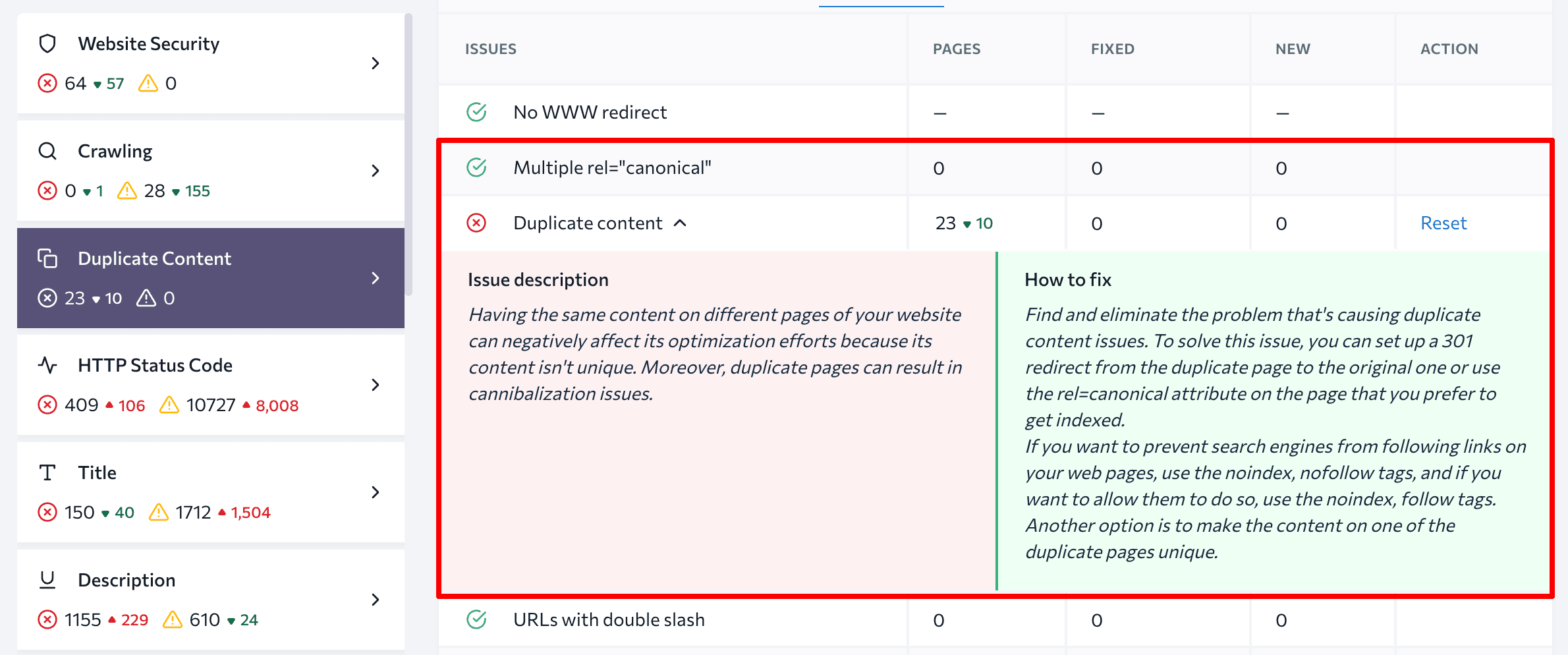
When pagination runs amok, it has the potential to generate duplicate pages. The same content cut across page 1, page 2, and so on might appear pretty similar to bots. This confuses search engines and it can damage rankings.
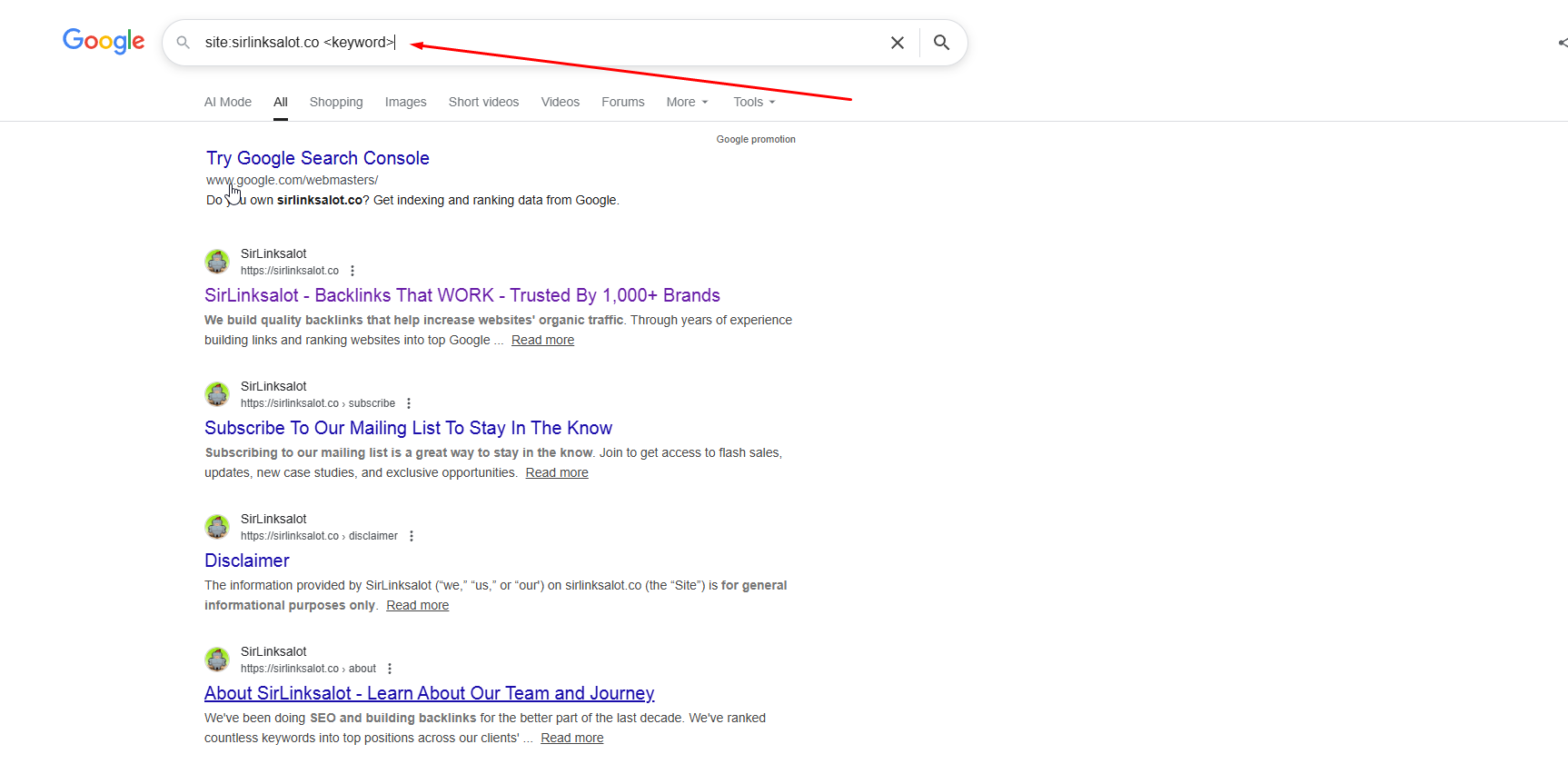
They should all have canonical tags pointing back to the series or category page. A quick check with “site:yourdomain inurl:page” can show where duplicates have crept in. If you see lots of similar pages getting indexed, remove or noindex low-value ones.
Benefits of Good Pagination SEO Keep your URLs clean and consistent to help search engines focus on what matters.
3. Link Equity
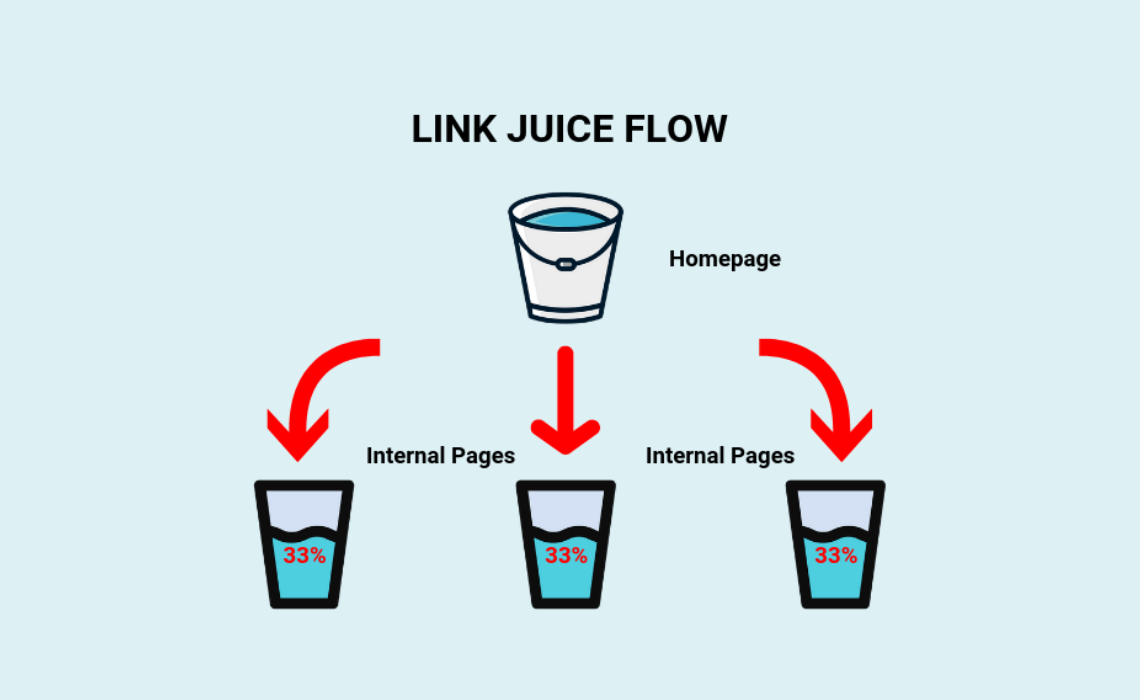
Link equity is the “authority” transferred from one page to another via links. If you link too heavily to paginated pages, you run the risk of diluting this authority. Instead, link primarily to your main category or topic pages.
Use sensical and contextual anchor text like “see all articles” instead of “next.” Too many links to page 4 or 5 create clutter, not value. By concentrating internal links on your best content, you keep your site’s authority robust.
4. User Experience
Most of all, pagination is about people. Well-defined, convenient pagination allows users to browse without angst. Good pagination links are visible and they make sense.
Experiment with different styles such as ‘Load More’ or numbered pages and observe user behavior. If you slice content into small, digestible chunks, you keep users happy and your site inviting, regardless of where somebody arrives from.
Correct Pagination SEO Implementation
A good pagination SEO strategy is more than just slapping on links at the bottom of a page. The real challenge is demonstrating to both users and search engines how your paginated content interrelates. Remember, search engines learn from your structure, so consistency in URLs and navigation is crucial.
With the right tags, metadata, and a crawl-friendly setup, your site is great for visitors and search engines can catch every page you want seen. Below, the key components converge: crawlable links, self-referencing canonicals, and optimized metadata, each with actionable instructions and pragmatic tips.
Crawlable Links
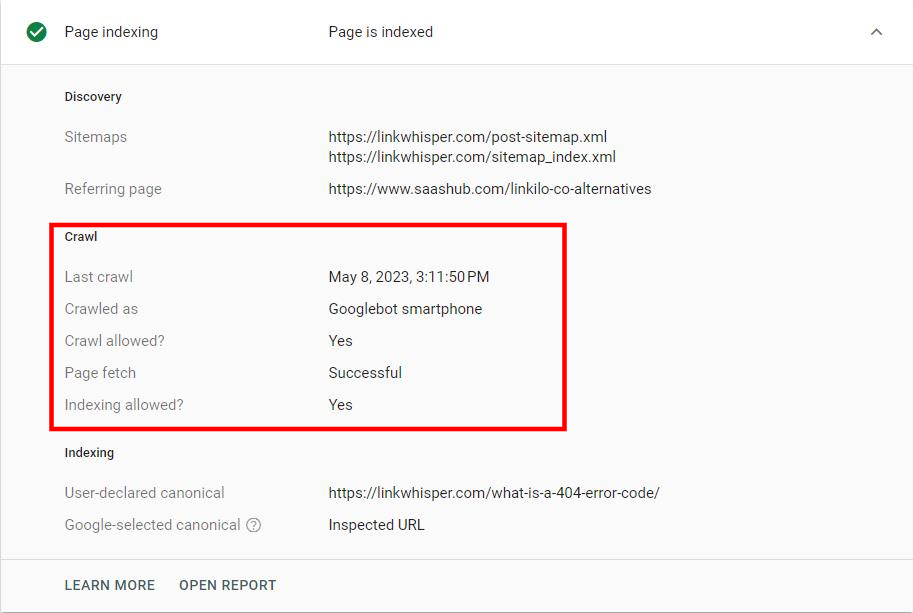
There has to be a way for search engines to discover and crawl the paginated pages. Unless a bot can crawl your links, those deeper pages can remain unseen, keeping great content from the search results. Using regular anchor tags (<a href>) for pagination is ideal.
Don’t use buttons or dropdowns for pagination navigation, as search engines ignore these. Many big news sites have made this error, with entire sections of archives unindexed. A clean, logical order — such as Page 1, Page 2, and so on — assists crawlers to navigate from beginning to end.
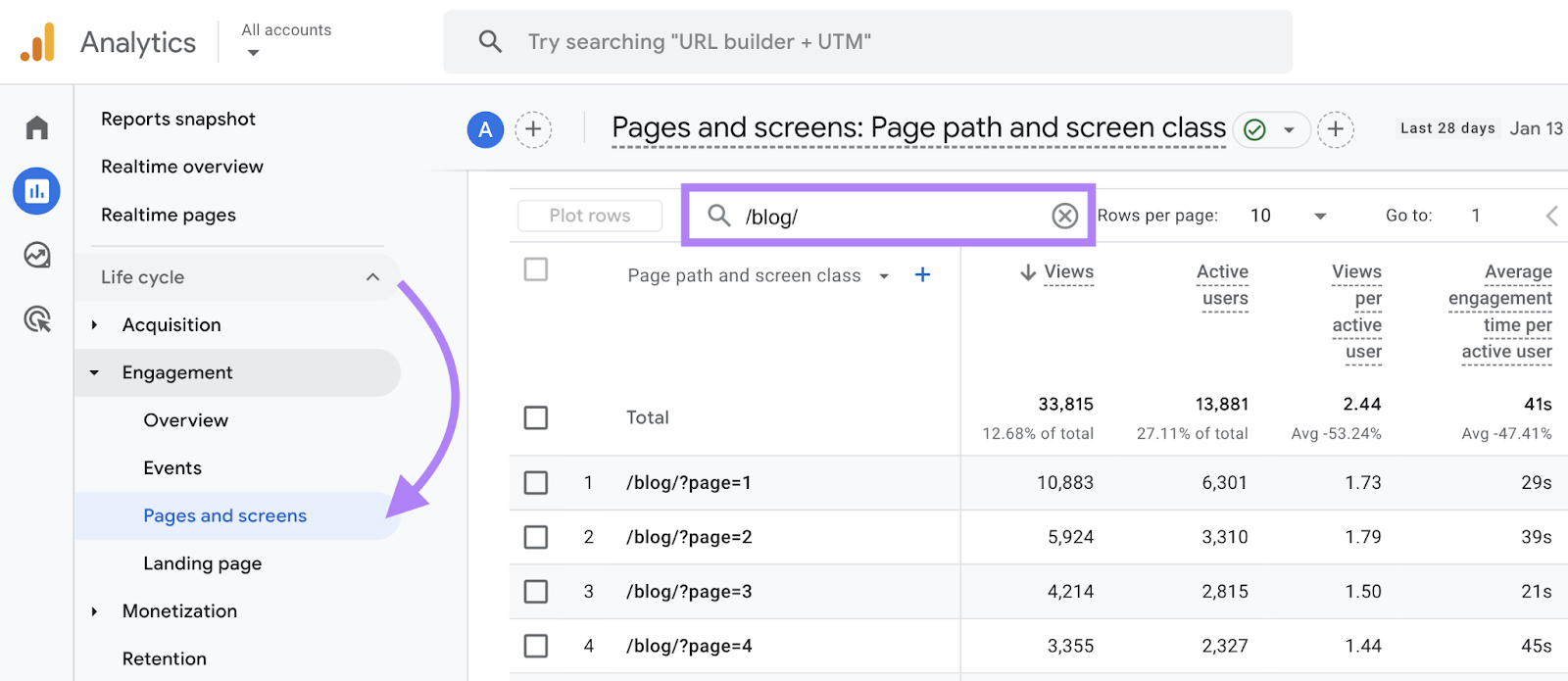
Never use # or #! Fragments in pagination. These are not crawlable and can block indexing. On huge sites with thousands and thousands of pages, crawl budget counts. If Googlebot lingers on one section, it may overlook other pages. Pagination audits often catch broken or missing links, avoiding dead ends.
Flat hierarchy works for most sites. For instance, /blog/page/1/ and /blog/page/2/ are explicit and simple for users and crawlers alike. Watch out for infinite scroll! Users like it, but it can trap bots on one page unless you have crawlable links elsewhere.
Self-Referencing Canonicals
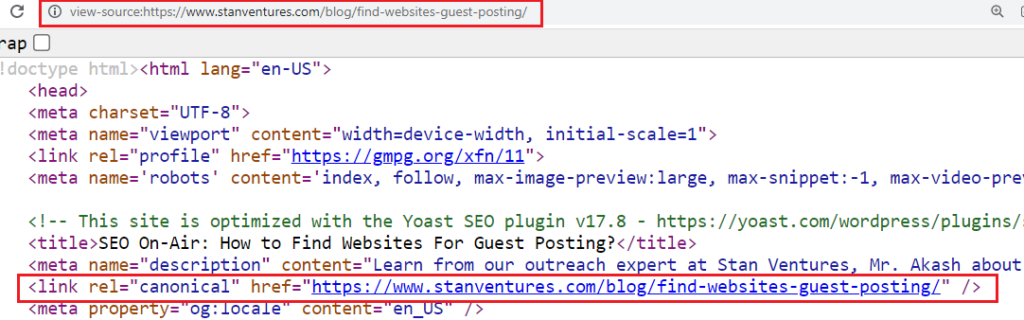
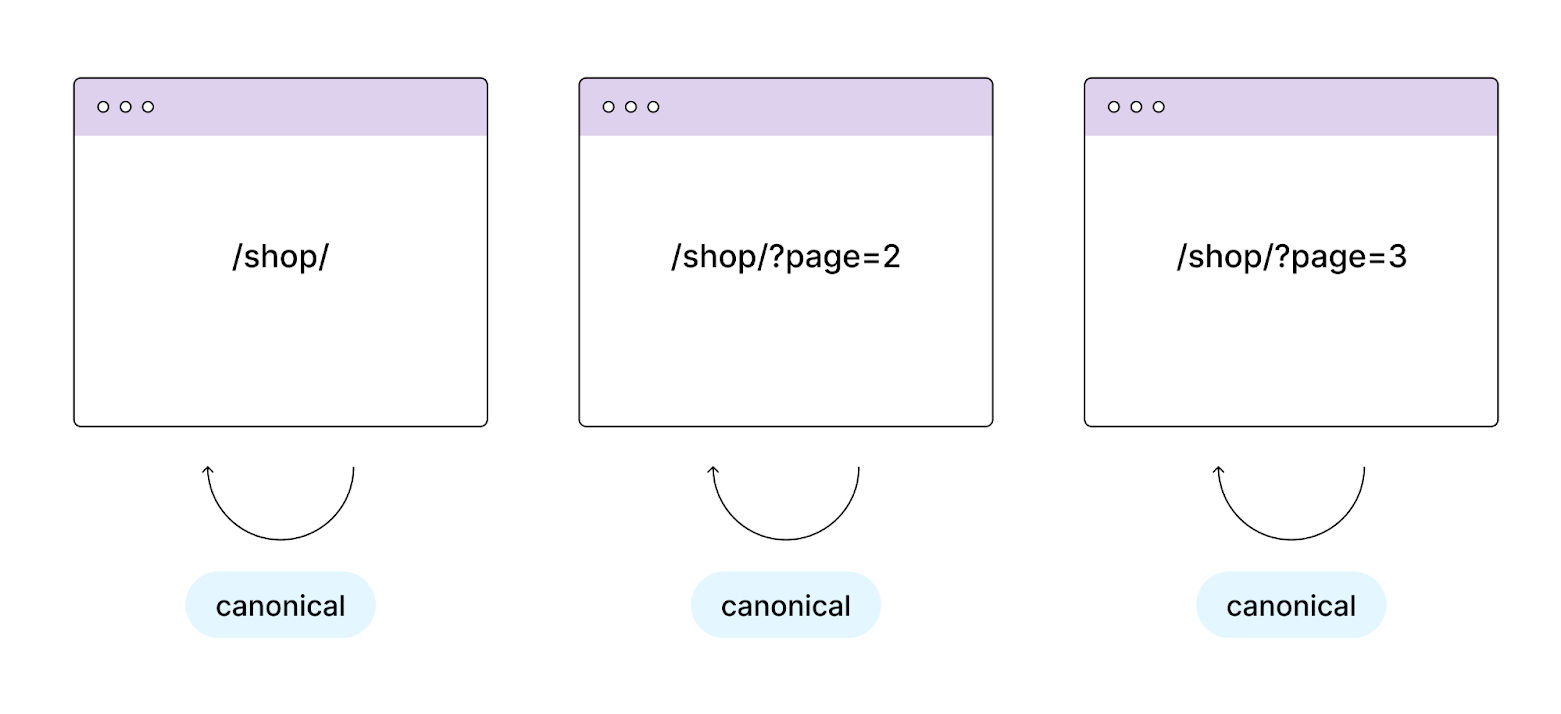
Each paginated page needs a self-referencing canonical. Page 2 has a canonical to itself, not back to Page 1. This tells search engines that each page is unique, so it should be indexed separately and not considered a duplicate.
Some older guides will recommend pointing every page’s canonical to page 1. That was standard for a time, but it can lead to issues such as losing signals to inner pages. Now, search engines want to see canonicals that correspond with the actual URL.
This avoids duplicate content problems and ensures signals such as links accrue to the appropriate page. Review canonicals now and then, especially after site modifications. Copying the wrong canonical can mean a whole series of pages gets ignored.
Optimized Metadata
Each paginated page should have a descriptive title and meta description of its own. For example, not ‘Product Listings’, but ‘Product Listings – Page 2’. This allows users and search engines to understand their location. Numbering the page prevents confusion, particularly for big catalogs or blogs.
So it’s clever to have just the first page target the primary keywords. For instance, Page 1 can use your focus keyword, but Page 2 and later should be de-optimized, perhaps just adding the page number. This prevents pages from cannibalizing each other in search results.
Header tags should follow the same pattern: clear on Page 1 and more basic on later pages. Keep your meta data fresh. If your SEO objective or content type changes, update titles and descriptions. This increases the relevance of your results and improves CTR.
Common Pagination SEO Mistakes
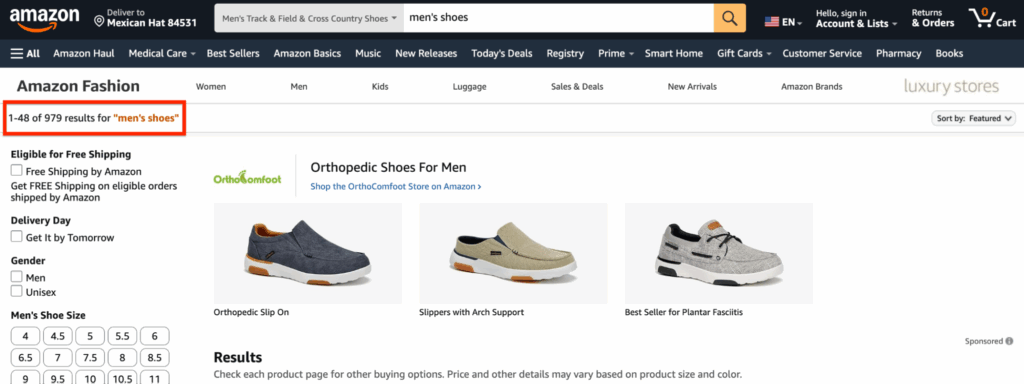
Pagination SEO may seem straightforward initially, but the devil is in the details, which can lead to common pagination issues that confuse even expert teams. These blunders can stack up, impeding both rankings and user delight. Here’s a checklist to identify and correct the most common errors along with their significance.
Noindexing Pages
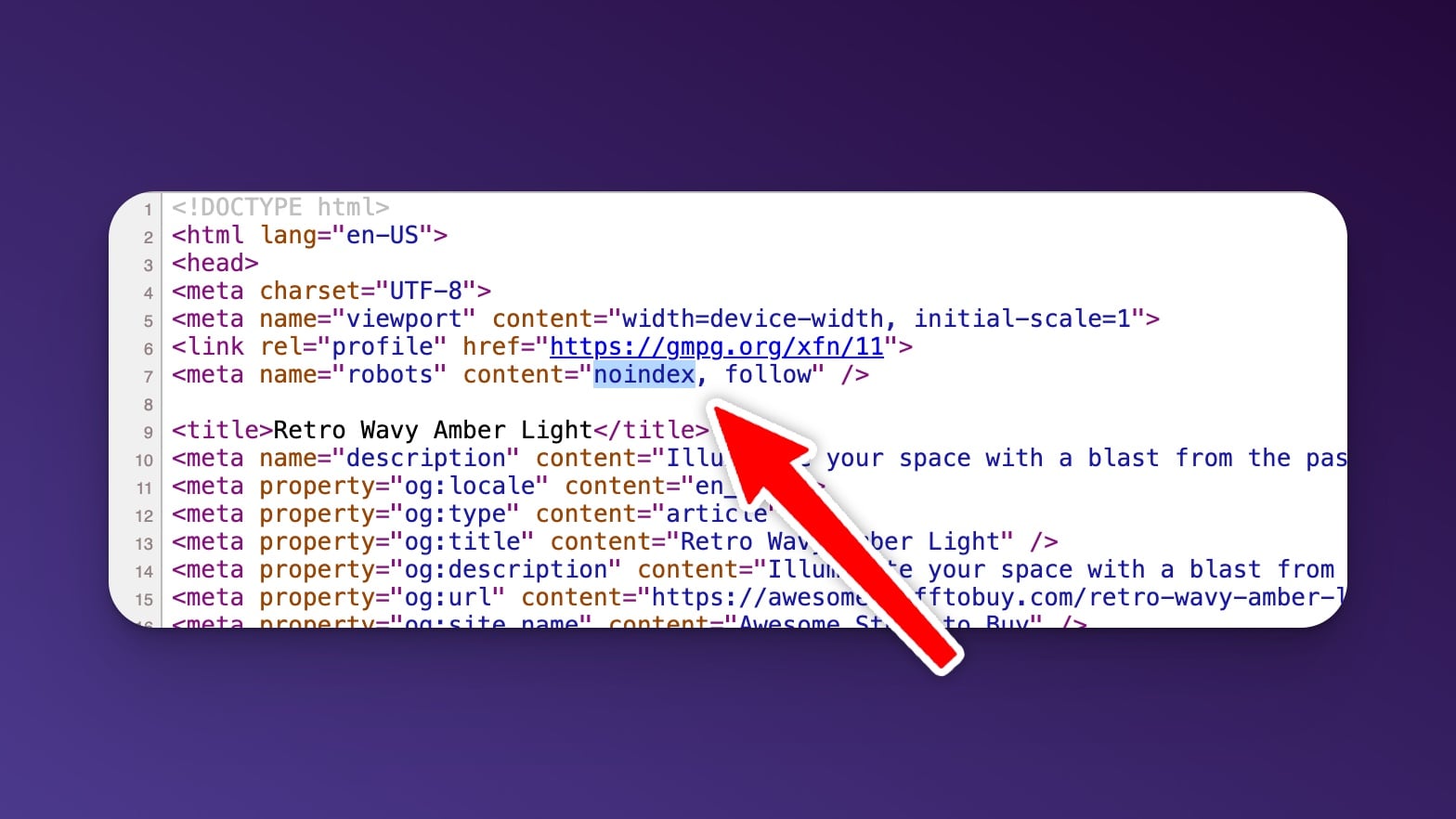
It’s tempting to just slap noindex tags on paginated pages because they seem “thin.” If you noindex important pages, you lose out on good stuff that helps your entire site rank. For instance, e-commerce category pages in a series tend to contain their own unique products absent from page one.
To noindex them is to sever that value. A smarter route is to instead only noindex pages with minimal or no unique content, such as empty filter combinations or vanity results. Go back and review your site’s paginated pages.
Check search demand and check content quality. Select which ones you want to remain indexed. Always ensure that your noindex strategy aligns with your SEO objectives. Shortcuts in this area can lead to missed traffic and poorer user experiences.
Blocking Crawlers
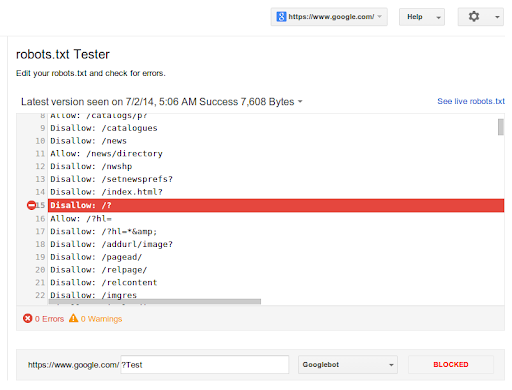
Robots.txt mix-ups keep paginated content out of crawler reach. Here’s a silent killer: pages appear fine to users but disappear from search. Use Google’s robots testing tool to see if crawlers can access all your paginated URLs, such as /category/page/2 or /blog/page/3.
Be sure you’re only blocking pages with no value, not entire series of paginated listings. Check your robots.txt file following any major update or redesign. It’s clever to keep an eye on crawl stats in Google Search Console so you’ll notice any abrupt decline in pages indexed.
Giving access to the right pages gives search engines a complete picture of your site and helps users search for what they need more quickly.
Canonicalizing to Page 1
Too many sites set all paginated pages’ canonicals back to page 1. This confuses search engines, making all those pages appear as duplicates rather than unique pieces of the complete. Instead, each paginated URL should have a self-referencing canonical tag, such as /category/page/2 pointing at itself.
This tells search engines that each page counts. It steers clear of duplicate content problems. Remember to audit canonical tags regularly, particularly post any site restructuring.
This keeps your configuration compatible with your SEO plan and assists both engines and visitors in navigating your content effortlessly.
The rel=prev/next Legacy
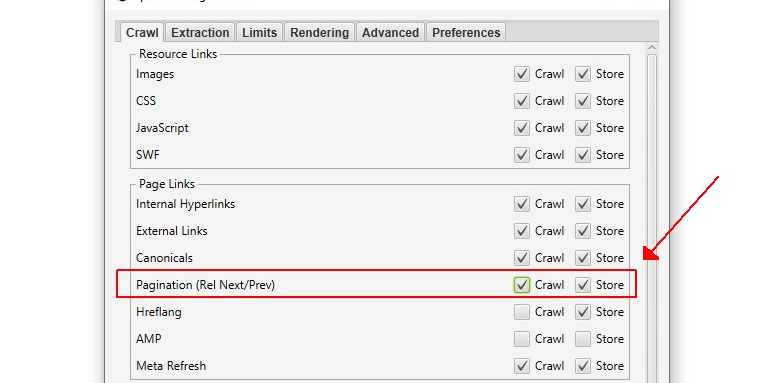
Pagination, as a best practice for technical SEO, has been a moving target for SEO. Tactics have evolved as search engines update their advice, and the importance of optimizing pagination pages with signals like rel=prev/next remains in flux. The table below gives a snapshot of the evolution.
|
Era |
Recommended Approach |
Key Google Advice |
|---|---|---|
|
Early 2010s |
Use rel=prev/next |
Signal paginated series to Google |
|
2019 (deprecation) |
Signals ignored by Google |
Focus on crawlable, indexable pages |
|
Present |
Usability, canonical, structure |
Prioritize user experience, updated technical cues |
Historical Context
The rel=prev/next attributes began as a means for site owners to identify the order of paginated content, allowing search engines to more effectively crawl page series. Their purpose was to link related pages, such as page 1, page 2, and so on, so that search engines could diffuse PageRank across the series and direct users to the most useful page.
In practice, a lot of sites skipped important steps — for example, they wouldn’t link page 2 to page 1 with rel=”prev,” breaking the chain and missing signals. They were never strict rules for Google—they were hints, not orders. This meant that even when perfectly implemented, a site couldn’t ensure search engines would treat the paginated series as desired.
Legacy tactics frequently over-relied on these cues, ignoring that all pages in a series should still be crawlable and indexable. In retrospect, relying exclusively on rel=prev/next was limiting. Pages that returned anything other than a 200 status could be bypassed in search, leaving holes in how content was indexed.
The best legacy lessons are to keep paginated URLs fully functional and avoid canonicals that always point to page 1, which rob deeper pages of relevance.
Google’s Deprecation
In 2019, Google officially declared that they no longer use rel=prev/next as a crawling or indexing signal, marking a significant shift in the SEO landscape. For teams relying on these tags, it became essential to rethink their entire pagination setup. The focus now shifts to ensuring that each pagination page is not only discoverable but also self-contained for both users and search engines, enhancing overall website pagination.
Staying informed about Google’s updates is crucial for anyone involved in optimizing pagination pages. Best practices must be monitored closely, as strategies that work today may not be effective tomorrow. Therefore, it’s important to prioritize clean architecture, indexable URLs, and user-friendly navigation, which are vital for effective page optimization and improving page performance.
While legacy tags can still aid in accessibility and user experience, they should not be relied upon for boosting rankings. There is no one-size-fits-all solution anymore. Regularly evolve your pagination handling as part of routine site audits, ensuring that every page in a series is valuable and accessible, even if it is buried deep in the pagination sequence.
Modern Signals
Today’s SEO is based on solid site architecture and clear signals, not markup like rel=prev/next. Use easy-to-follow pagination links so people and bots can navigate through your site. A logical structure with visible navigation, such as numbered links or ‘Load More’ buttons, enhances user experience and supports search engine optimization.
Develop on-page components such as canonical tags and metadata for each pagination page in the series. Don’t direct every canonical to page one; each page should have its own canonical and be able to rank if it fits a searcher’s intent. Ensure that all your paginated URLs are fast loading, easy to use on any device, and accessible for all.
Best practice at this point is to remain flexible. SEO is never still—new signals, new algorithms, and new user habits emerge constantly. Regularly audit your pagination setup and stay updated with what Google’s team is sharing to adapt effectively.
Rethinking Pagination Alternatives
Pagination influences how visitors and search engines discover and navigate site content. Choosing between classic pagination, infinite scroll, or a load more button can significantly impact crawlability, indexability, and page performance. There are trade-offs with every option, especially for content-rich or ecommerce sites, which may face common pagination issues.
- Traditional Pagination: Reliable for SEO, helps with crawlability, and keeps things organized. It can feel slow for users, who have to click a lot to view all content.
- Infinite Scroll: Feels smooth and modern, especially on mobile. It keeps users engaged but can cause indexing issues if search engines can’t access all loaded content.
- Load More Button: Offers a middle ground, letting users see more without leaving the page. SEO can be tricky if not properly established.
- View All Option: Great for thoroughness, loading too much on one page can slow things down, especially on mobile.
Infinite Scroll
Sites with lots of content—news, blogs, or social feeds—often implement pagination pages instead of infinite scroll. This approach allows users to navigate through a structured paginated list, keeping them engaged while ensuring that search engine crawlers can index all content effectively. By using pagination links, each chunk of content can have a distinct URL, making it easier for users to access specific sections and improving overall page optimization.
However, relying solely on infinite scroll can harm SEO if search engines struggle to index the content. To mitigate pagination issues, ensure that key items are accessible from the top-level navigation. Observing user stats can provide insights into whether users are getting lost or bouncing, indicating if infinite scroll is the right fit for your site.
Many sites successfully merge infinite scroll with numbered pages, allowing for a seamless user experience while maintaining crawlable links for search engine robots. This hybrid approach can enhance user engagement and improve page performance, making it a viable option for content-heavy websites.
Load More Buttons
Load more buttons put users in control, allowing them to select when to view additional content. This is great for product lists or blog archives and makes browsing nice and smooth without inundating the page. For SEO, run AJAX with pushState or the like to update the URL as new content is displayed.
See how visitors interact with the button—if they keep clicking or fall away after a single circuit. If users like the stream, it could increase average session duration. Still, too much stuff at a time can bog things down, so it is clever to cap how much pumps in with every click.
This choice tends to find the optimal compromise between quick scanning and powerful SEO.
View All Pages
A view all alternative provides users with everything at once, which is convenient for small product collections or short lists. This assists the skimmer who wants to compare it all at once.
One page with hundreds of items can be slow to load, especially on mobile. To prevent SEO issues, ensure the page isn’t excessive and set meta robots to limit indexing if necessary. Following about brad Rethinking Pagination Alternatives by flipping on and off scrollbars or paned viewport windows.
When used intelligently, view all can increase satisfaction and get users what they need quickly.
>
Auditing Your Pagination
A solid audit keeps your pages accessible and usable to both humans and search engines. Broken or missing pagination can drown pages, damage rankings, or make users abandon.
First, search for the fundamentals. Be sure each paginated series includes obvious ‘next’ and ‘previous’ links. These links assist search engines in crawling incrementally and assist actual people navigate through content. Check your URL paths—keep them tidy and steady, like /products/page/2 or ?page=2. No weird strings or skipped numbers.
Spurious or broken links hide pages from both bots and users. If you use JavaScript for things like “load more” or infinite scroll, test if Google and other search engines can get to every page. Occasionally these will block bots and prevent content from being indexed.
Next, audit for common issues quickly. Pages may load okay, showing a ‘200’ code, but have no actual content. These ‘empty’ pages waste crawl budget and can lower trust with both users and search engines.
Correct issues with pagination and wrong canonicals too. These redirect search engines to the incorrect version of a page, which means parts of your site may be left out of search results. Mobile usability is another major factor. Audit your pagination. Ensure buttons, links, and scroll features function nicely on all devices. A bad mobile experience can make visitors bounce, which can drop your rankings over time.
A checklist can help keep audits on track:
- Check for “next” and “previous” links on all series.
- Ensure your URL structure is consistent and simple.
- Test “load more” and infinite scroll for crawl access.
- Or, better yet, can you find any ‘blank’ or empty pages that download but display nothing?
- Confirm canonical tags are set right on every page.
- Review mobile layout and check for tap-friendly controls.
- Google Search Console or similar tools can help you identify crawl errors or dropped pages.
Best practices for pagination are to follow this audit every few months, not just once. Leverage data from your site analytics or search tools to identify trends, such as pages losing traffic or no longer ranking.
Address problems quickly. Minor tweaks have the power to accelerate crawling, increase discoverability, and enable users to discover essential items. Trust builds trust and keeps your site robust in search.
Conclusion
Proper pagination SEO keeps your site clean and fast for humans and search engines alike. Nobody likes slow load times or lost pages. Imagine those huge stores or news blogs—pages connect slick, people discover things quickly, and Google indexes all of it. New audits find vulnerabilities and mend dead links. Experiment with easy solutions such as obvious next and previous links and persistent URLs. Some use numbered pages, others use infinite scroll, but both require savvy link bots. Minor adjustments frequently provide a lift and establish confidence with your audience. Want to beat the competition in search? Clean up your pagination. Contact the crew at SirLinksALot for additional advice or a new SEO strategy.
Frequently Asked Questions
What is pagination SEO?
Pagination SEO focuses on optimizing pagination pages to enhance user experience and ensure that search engines can easily navigate and index paginated URLs, making every page discoverable.
Why is pagination important for SEO?
Pagination enhances the user experience and facilitates search engine crawlers to index numerous pagination pages of content. It avoids duplicate content and makes deep pages crawlable.
What are common mistakes with pagination SEO?
Typical errors include neglecting internal linking and improperly using canonical links, which can lead to pagination issues that affect indexation and ranking problems.
Should I still use rel=prev and rel=next for pagination?
No, Google no longer uses rel=prev and rel=next as indexing signals. Instead, focus on effective internal linking and straightforward navigation for optimizing pagination pages.
What are alternatives to traditional pagination?
Options like infinite scroll and ‘Load More’ buttons must consider crawlability and accessibility for both search engine crawlers and users in the pagination setup.
How do I audit my site’s pagination for SEO?
Ensure that all your pagination pages are crawlable and indexed, with unique titles and meta descriptions. Utilize site audit tools to identify pagination issues or duplication problems.
How can correct pagination improve user experience?
Well-optimized pagination pages enhance user experience, making it easier for users to browse through long lists of content, boosting engagement and lowering bounce rates while facilitating quicker access to information.